> ## Documentation Index
> Fetch the complete documentation index at: https://docs.pinecone.io/llms.txt
> Use this file to discover all available pages before exploring further.
# Dedicated Read Nodes
> Dedicated read nodes use provisioned hardware for read operations, providing predictable, low-latency performance at high query volumes.
## Overview
Pinecone indexes built on dedicated read nodes use provisioned read hardware to provide predictable, consistent performance at sustained, high query volumes. They're designed for large-scale vector workloads such as semantic search, recommendation engines, and mission-critical services.
Dedicated read nodes differ from on-demand indexes in how they handle read operations. While on-demand indexes use shared, multi-tenant capacity for reads, dedicated read nodes provision exclusive hardware for reads—memory, local SSDs, and compute. Both index types use Pinecone's serverless infrastructure for writes and storage.
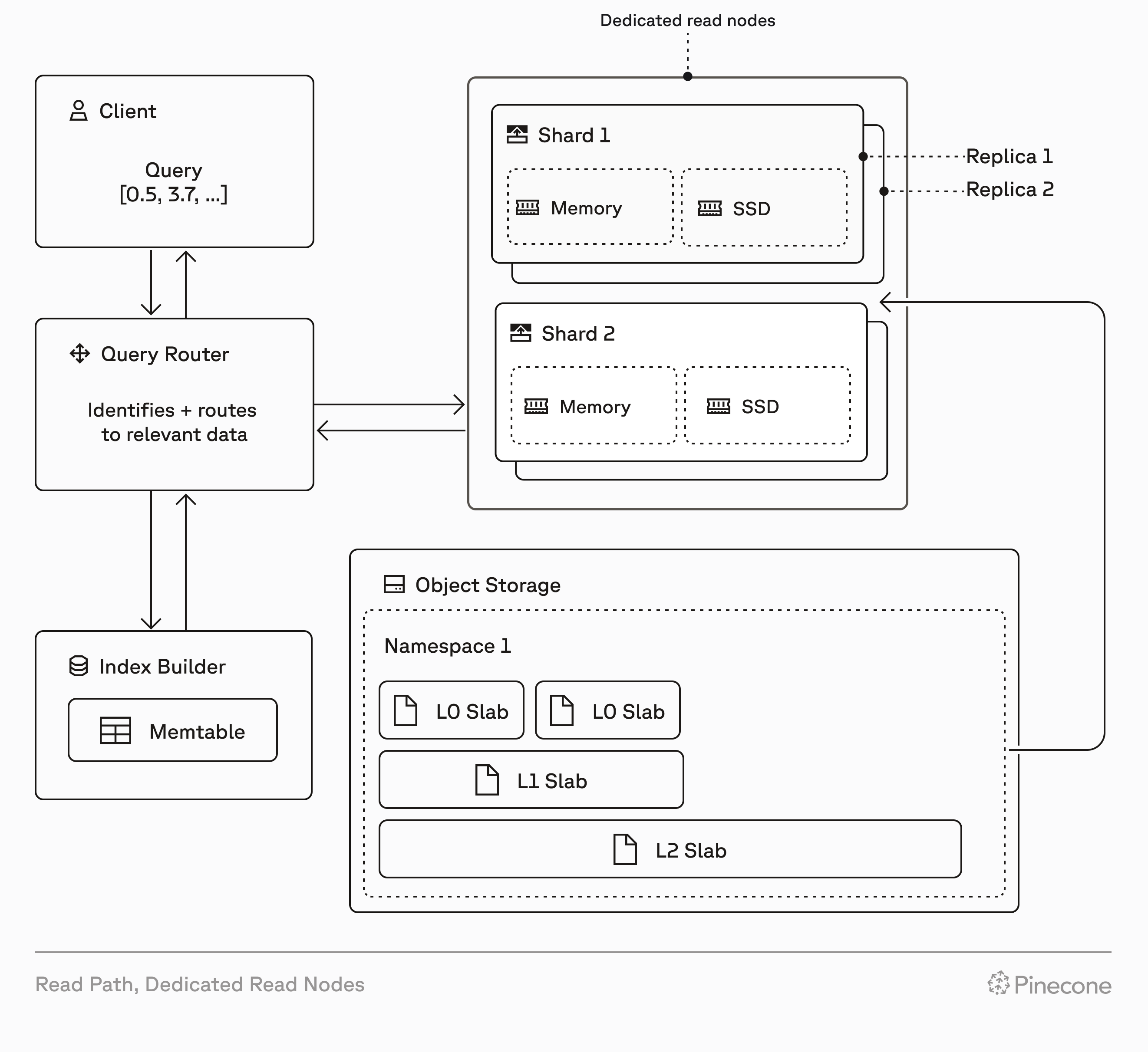
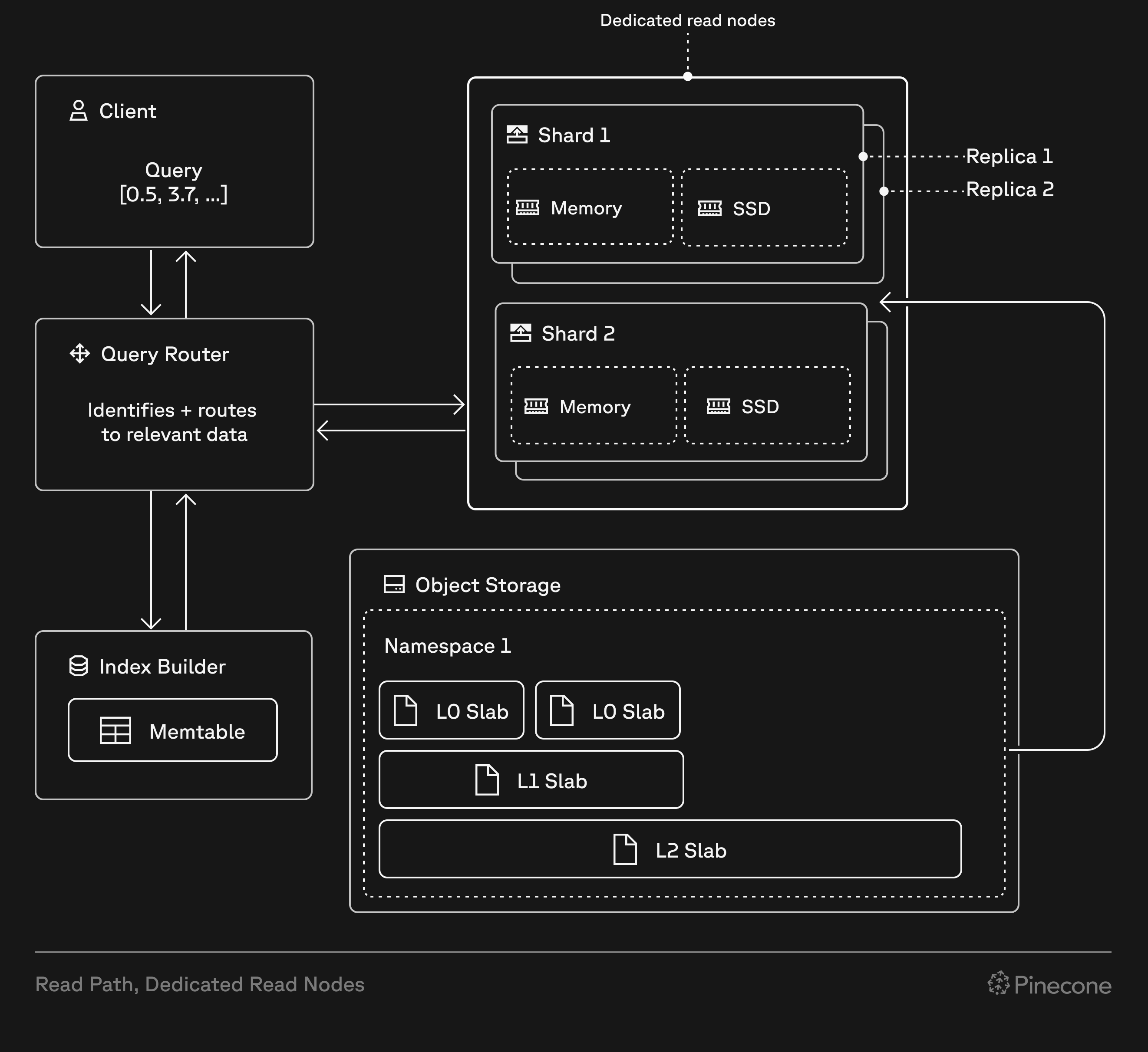
When you create a dedicated read nodes index, Pinecone provisions resources based on your choice of [node type](#node-types), number of [shards](#shards), and number of [replicas](#replicas). These resources include local SSDs and memory that cache all your index data, and provide dedicated query executors to handle read operations (query, fetch, list). This architecture eliminates cold starts and ensures consistent low-latency performance, even under heavy load.
Dedicated read nodes support dense, sparse, hybrid, and [full-text search](/guides/search/full-text-search) indexes, giving you flexibility in your search and retrieval strategy. Because storage (shards) and compute (replicas) scale independently, you can optimize for your specific workload characteristics.
 ## On-demand vs dedicated
On-demand indexes and dedicated read nodes are both built on Pinecone's serverless infrastructure. They use the same write path, storage layer, and data operations API.
However, every dedicated read nodes index has isolated hardware for read operations (query, fetch, list), allowing these operations to run on dedicated query executors. This affects performance, cost, and how you scale:
| Feature | On-demand | Dedicated read nodes |
| :---------------------- | :--------------------------------------------------------------------------------------------------------------------------------------------- | :----------------------------------------------------------------------------------------------------------------------------------------------------------------- |
| **Read infrastructure** | Multi-tenant compute resources shared across customers | Isolated, provisioned query executors dedicated to your index |
| **Read costs** | Pay per [read unit](/guides/manage-cost/understanding-cost#serverless-indexes) (1 RU per 1 GB of namespace size per query, minimum 0.25 RU) | Fixed hourly rate for read capacity based on node type, shards, and replicas |
| **Other costs** | [Storage](/guides/manage-cost/understanding-cost#storage) and [write](/guides/manage-cost/understanding-cost#write-units) costs based on usage | [Storage](/guides/manage-cost/understanding-cost#storage) and [write](/guides/manage-cost/understanding-cost#write-units) costs based on usage (same as on-demand) |
| **Caching** | Best-effort; frequently accessed data is cached, but cold queries fetch from object storage | Guaranteed; all index data always warm in memory and on local SSDs |
| **Read rate limits** | [2,000 RUs/second per index (adjustable)](/reference/api/database-limits#rate-limits) | No read rate limits (only bounded by CPU capacity) |
| **Scaling** | Automatic; Pinecone handles capacity | Manual; add [shards](#shards) for storage, add [replicas](#replicas) for throughput |
| **Query-time tuning** | Parameters accepted but have no effect | Optional [`scan_factor` and `max_candidates`](#query-time-search-parameters) to trade recall for lower latency and higher throughput |
| **Best for** | Variable workloads, multi-tenant applications with many namespaces, low to moderate query rates | Sustained high query rates, large single-namespace workloads, predictable performance and cost |
## When to use dedicated read nodes
Dedicated read nodes are ideal for workloads with millions to billions of records and predictable query rates. They provide performance and cost benefits compared to on-demand for high-throughput workloads, and may be required when your workload exceeds on-demand rate limits.
There's no universal formula for choosing between on-demand and dedicated read nodes—performance and cost vary by workload (vector dimensionality, metadata filtering, and query patterns). Consider the following factors when making your decision:
With dedicated read nodes, you allocate dedicated read hardware for your index, and your data is cached in memory and on local SSDs. This provides:
* Consistent low latency under heavy load.
* No cold starts (fetching data from object storage).
* Performance isolation from other workloads.
* Linear scaling by adding replicas.
* Predictable costs based on fixed hourly rates for provisioned hardware.
If predictable performance and cost are critical for your application, dedicated read nodes may be a better fit than on-demand.
On-demand indexes are subject to [read unit rate limits](/reference/api/database-limits#rate-limits) (default: 2,000 RUs/second per index).
A high query volume on a large index can exceed these limits. For example, a 15 GB namespace at 150 QPS requires approximately 2,250 RUs/second (`15 RUs per query × 150 QPS`), which exceeds the default rate limit.
Dedicated read nodes have no read rate limits and provide dedicated capacity for predictable QPS without throttling (bounded only by CPU capacity), making them better suited for high-throughput workloads.
Recommendation engines for use cases such as e-commerce and media require very high throughput and low latency to maintain positive user experiences. Dedicated read nodes are purpose-built for these use cases, providing:
* Consistent performance for thousands of queries per second
* Low latency for real-time recommendations
* Scalability to billion-vector datasets
* No performance degradation during traffic spikes
Similar requirements apply to other real-time use cases like semantic search at scale, personalization engines, and mission-critical services with strict performance SLOs.
Dedicated read nodes indexes support only a single namespace. If your application requires multiple namespaces, on-demand is a better fit.
Multi-namespace support is coming soon. For early access, [contact us](https://www.pinecone.io/contact/).
On-demand indexes are better suited for workloads with unpredictable or highly variable traffic patterns. For example:
* RAG systems with variable query volumes
* Agentic applications with sporadic usage
* Prototypes and development environments with intermittent activity
* Scheduled jobs with infrequent, batch-style queries
Additionally, on-demand is better for indexes with many namespaces, even if you have high query volumes. Dedicated read nodes currently only support single-namespace indexes, so multi-tenant applications requiring namespace-based isolation should use on-demand until multi-namespace support is available.
For these scenarios, on-demand's elasticity and usage-based pricing provide better cost efficiency than provisioning dedicated capacity.
Dedicated read nodes **can** handle predictable traffic spikes efficiently if you scale replicas proactively via the API. For example, you can provision extra replicas before a scheduled email campaign and scale back down afterward. Auto-scaling will be available in a future release.
On-demand and dedicated read nodes have different cost structures. The key difference is read costs: on-demand uses usage-based pricing, while dedicated read nodes use a fixed hourly rate based on provisioned hardware. Write and storage costs are usage-based for both modes.
Dedicated read nodes become cost-effective when you have predictable, sustained query volumes that make full use of your provisioned capacity. With unpredictable or low query volumes, you pay hourly rates even when your machines sit idle, making on-demand's usage-based pricing more economical.
For detailed cost information, comparison tables, and estimation tools, see the [Cost](#cost) section of this guide.
Performance depends on your specific workload — index size, vector dimensionality, metadata filtering, query patterns, throughput requirements, and latency requirements. Testing is the only way to know for sure whether dedicated read nodes are right for your scenario.
For a step-by-step guide to testing, see [Test your workload](#test-your-workload).
If you need guidance choosing a capacity mode (on-demand or dedicated read nodes) or sizing your index configuration, [contact us](https://www.pinecone.io/contact/).
## Key concepts
Before creating a dedicated read nodes index, understand the configuration options that determine capacity and performance.
### Node types
A node is the basic unit of compute and cache storage capacity for a dedicated read nodes index. Each shard runs on one node, so the node type you choose determines the performance characteristics and cost of your index. The total number of nodes in your index is calculated as `shards × replicas`. For example, an index with two shards and two replicas uses four nodes.
There are two node types: `b1` and `t1`. Both are suitable for large-scale and demanding workloads, but they differ in processing power and memory capacity, and they cache different data.
| | **b1 (Balanced)** | **t1 (Performance)** |
| -------------------- | ------------------------------------------------------------------------------- | --------------------------------------------------------------------------------------------------------------- |
| **Memory caching** | Vector index stored in memory | Vector index + vector projections cached in memory |
| **Use case** | Predictable performance for sustained query rates with balanced cost efficiency | Highest performance for the most demanding workloads with extreme query volumes and strict latency requirements |
| **Storage** | 250 GB per shard | 250 GB per shard |
| **Compute & memory** | Base-level compute and memory resources | \~4x more compute and memory than `b1` |
| **Cost** | Lower-cost option | \~3x the cost of `b1` |
Consider using `t1` nodes if your performance requirements are not met by `b1` nodes, or if `t1` nodes are more cost-effective than `b1` nodes for your workload.
When choosing a node type, remember that:
* Both types of nodes provide 250 GB of storage per shard. The difference is in compute and memory, which affects query performance.
* Because `t1` nodes cache more data in memory than `b1` nodes, an index may require more shards on `t1` than on `b1` (for the same data).
* You can [change node types](#change-node-types) after creating your index.
### Shards
Shards determine the storage capacity of an index. Each shard provides 250 GB of storage, and data is split across all the shards in an index. To respond to a query, the index gathers data from all shards as needed. To determine how many shards you need, [calculate your index size](#calculate-the-size-of-your-index) and then [calculate the number of shards](#number-of-shards).
It's your responsibility to allocate enough shards to accommodate the size of your index. If your index exceeds the capacity of its shards, write operations (upsert, update, delete) are blocked, but read operations continue to work normally.
### Replicas
Replicas multiply the compute resources and data of an index, allowing for higher query throughput and availability. Each replica is a complete copy of your index data and has its own dedicated compute resources.
* Throughput scales approximately linearly with replicas. For example, if one replica handles 50 QPS at your target latency, two replicas should handle approximately 100 QPS.
* You can scale replicas up or down with no downtime using the API. See [Add or remove replicas](#add-or-remove-replicas).
* Minimum: 0 replicas ([pauses the index](#pause-an-index)).
* For high availability, use at least two replicas. The recommended approach is to allocate `n+1` replicas where `n` is your minimum for throughput. Pinecone distributes replicas across availability zones (up to three per region), so if one zone fails, remaining replicas continue serving queries.
To determine how many replicas you need, [test your workload](#test-your-workload) and then [calculate the number of replicas](#number-of-replicas).
Actual performance varies based on workload characteristics (query complexity, vector dimensions, metadata characteristics), [metadata filter](/guides/search/filter-by-metadata) selectivity, and [node type](#node-types) (`b1` vs `t1`). Always test with your specific workload.
### Index fullness
Index fullness measures how much of your index's allocated capacity is being used. To ensure predictable performance, dedicated read nodes cache your data in memory and on local SSD.
* You can use Pinecone's API to [check index fullness](#monitor-index-fullness). There are three metrics to monitor: `memoryFullness`, `storageFullness`, and `indexFullness`.
`indexFullness` is the maximum of `memoryFullness` and `storageFullness`.
* Usually, storage fills up first. However, memory can be the limiting factor when you have `b1` nodes with many low-dimension vectors, or when you have `t1` nodes with high-dimension vectors and lots of metadata.
* Monitor fullness regularly and [add shards](#add-or-remove-shards) before your index reaches capacity. When `indexFullness` reaches 1.0 (100%), write operations (upsert, update, delete) are blocked, but read operations continue to work normally.
Add shards when [index fullness](#index-fullness) reaches 70-80%, especially if you expect continued growth. Adding shards reduces storage fullness (index data is spread across shards, so each stores less) and memory fullness (with less data per shard, there's less to cache in memory), helping you avoid write failures.
## Query-time search parameters
Dedicated read nodes support two optional query-time parameters — `scan_factor` and `max_candidates` — that let you trade off recall (search quality) for lower latency and higher throughput. By default, queries use internal heuristics that favor recall. If your application is latency-sensitive or needs higher QPS, you can tune these parameters to reduce the work done per query — or increase them for higher recall.
These parameters only take effect on dedicated read nodes indexes with dense vectors. On on-demand indexes, the parameters are accepted but have no effect. On indexes that store only sparse vectors, specifying either parameter returns an error. Using these parameters requires API version `2025-10` or later.
### How scan\_factor and max\_candidates work
Dense vector search on dedicated read nodes uses a two-stage pipeline:
1. **Scanning** — controlled by `scan_factor`. For IVF-based indexes, the system scans a fraction of partitions determined by `scan_factor / sqrt(num_partitions)`. A lower `scan_factor` scans fewer partitions, producing fewer candidates faster. This parameter only affects IVF-based slabs; for other index architectures (e.g., smaller indexes using flat search), `scan_factor` has no effect.
2. **Reranking** — controlled by `max_candidates`. The top candidates from the scanning stage are reranked by computing exact distances. More reranking improves recall but increases latency. This parameter applies to all index architectures.
The two parameters affect different stages and their effects are additive — you can set both to optimize each stage independently.
| Parameter | Type | Range | Default | Description |
| :------------------- | :------ | :----------------------------------- | :-------------------------------------------------------------- | :----------------------------------------------------------------------------------------------------------------------------------------- |
| **`scan_factor`** | Float | 0.5–4.0 | 4.0 | Controls how much of the IVF index is scanned to find vector candidates. Lower values scan fewer partitions and return results faster. |
| **`max_candidates`** | Integer | Your query's `top_k` value – 100,000 | 2500 (see [default behavior](#default-max_candidates-behavior)) | Maximum number of candidate vectors to rerank with exact distance computation. Higher values improve recall; lower values improve latency. |
You can set one or both per query. Omitting both preserves the current default behavior, so existing applications are unaffected.
#### Default `max_candidates` behavior
When `max_candidates` is not set, the system calculates an effective value using the following formula:
* If `top_k` \<= 1000: `min(top_k * 10, 1000)`
* If `top_k` > 1000: `top_k`
* Then, a floor of 2500 is applied (the effective value is at least 2500)
For most queries (where `top_k` \<= 2500), the effective default is **2500**. This is not the maximum possible value — you can raise `max_candidates` (up to 100,000) to increase recall, or lower it (down to your query's `top_k`) to reduce latency.
When you explicitly set `max_candidates`, the value you provide is used directly, bypassing the formula and the floor.
### Impact on recall and performance
Lower `scan_factor` or `max_candidates` values reduce the work done per query, which improves latency and throughput but may reduce recall. The tables below summarize benchmarked behavior on a 2.68M-vector index (1536 dimensions, cosine similarity). Actual results are dataset-dependent.
#### `scan_factor` benchmarks
Starting from the default (4.0), lowering `scan_factor` reduces the fraction of IVF partitions scanned:
| scan\_factor | Approximate recall (p50) | Relative throughput |
| :------------ | :----------------------- | :------------------ |
| 4.0 (default) | \~96% | 1x (baseline) |
| 2.0 | \~94% | \~1.5x |
| 1.0 | \~91% | \~2x |
| 0.5 | \~84% | \~4x |
Testing shows that lower `scan_factor` values can reduce p50 and p99 latency by 30–50% or more.
#### Tuning `max_candidates`
Higher `max_candidates` improves recall by reranking more candidates but increases latency and reduces throughput; lower values favor speed. For guidance on choosing values, see [Tuning guidance](#tuning-guidance). We recommend benchmarking on your own dataset and workload to find the right balance—use the [Test your workload](#test-your-workload) process to validate latency and recall.
### Tuning guidance
Start with the defaults and adjust based on your workload requirements:
* **To optimize for throughput/latency:** Lower `scan_factor` first (from the default of 4.0). This has the most impact on IVF-based indexes. If you need further improvement, lower `max_candidates` below the default of 2500 (down to your query's `top_k` value).
* **To optimize for recall:** Raise `max_candidates` above the default of 2500 (up to 100,000). This reranks more candidate vectors at the cost of higher latency.
**Trade-offs to consider:**
* **Adjust one parameter at a time.** `scan_factor` controls the scanning stage (IVF only) and `max_candidates` controls the reranking stage (all index types). Tuning them independently makes it easier to isolate the effect.
* **Safe defaults:** Omitting both parameters preserves existing behavior. There is no risk to existing queries.
* **Cost reduction:** By achieving higher throughput per node, you may be able to serve the same query rate with fewer replicas.
### Behavior by vector type
| Index / query type | Behavior |
| :----------------------------------------------- | :------------------------------------------------------------------------------------------------------------------------------------------------------------------------------------------------------------ |
| **Dense vectors, dense query** | `scan_factor` and `max_candidates` apply normally. |
| **Dense vectors, hybrid query (dense + sparse)** | Both parameters apply to the dense component only; the sparse component is unaffected. |
| **Sparse vectors only** | Specifying `scan_factor` or `max_candidates` returns an error. |
| **On-demand index** | Both parameters are accepted but have no effect on search behavior. You can use the same query code against on-demand (e.g., for development) and dedicated read nodes (for production) without modification. |
### API and SDK examples
Both parameters are optional fields on the `POST /query` request.
```bash curl theme={null}
PINECONE_API_KEY="YOUR_API_KEY"
INDEX_HOST="YOUR_INDEX_HOST"
curl -X POST "https://$INDEX_HOST/query" \
-H "Api-Key: $PINECONE_API_KEY" \
-H "Content-Type: application/json" \
-H "X-Pinecone-Api-Version: 2025-10" \
-d '{
"namespace": "example-namespace",
"topK": 10,
"vector": [0.1, 0.2, 0.3],
"scanFactor": 1.0,
"maxCandidates": 1000
}'
```
```python Python theme={null}
# Both parameters — balanced recall and latency
index.query(
namespace="example-namespace",
vector=[0.1, 0.2, 0.3],
top_k=10,
scan_factor=1.0,
max_candidates=1000
)
# scan_factor only — faster queries, lower recall
index.query(
namespace="example-namespace",
vector=[0.1, 0.2, 0.3],
top_k=10,
scan_factor=0.5
)
# Omit both for maximum recall (default behavior)
index.query(
namespace="example-namespace",
vector=[0.1, 0.2, 0.3],
top_k=10
)
```
```typescript TypeScript theme={null}
// Both parameters — balanced recall and latency
await index.query({
namespace: "example-namespace",
vector: [0.1, 0.2, 0.3],
topK: 10,
scanFactor: 1.0,
maxCandidates: 1000
});
// scan_factor only — faster queries, lower recall
await index.query({
namespace: "example-namespace",
vector: [0.1, 0.2, 0.3],
topK: 10,
scanFactor: 0.5
});
```
**Validation errors:**
| Condition | Error message |
| :-------------------------------------------------------------------------------------- | :---------------------------------------------------------------------------------------------------- |
| API version earlier than `2025-10` | `scan_factor and max_candidates parameters require API version 2025-10 or later` |
| `scan_factor` outside 0.5–4.0 | `scan_factor must be between 0.5 and 4.0, got {value}` |
| `max_candidates` below your query's `top_k` or above 100,000 | `max_candidates must be between {top_k} (top_k) and {max}, got {value}` |
| Used on an index that stores only sparse vectors (API error text says "sparse indexes") | `scan_factor and max_candidates parameters are not supported for sparse indexes` |
`scan_factor` and `max_candidates` do not affect billing. Read costs for dedicated read nodes are based on provisioned capacity (node type, shards, and replicas), not per-query effort. By tuning these parameters to achieve higher throughput, you may be able to serve the same query rate with fewer provisioned replicas, reducing your overall cost.
## Test your workload
To choose between on-demand and dedicated read nodes, or to optimize your dedicated read nodes configuration, test with your actual workload. Performance varies based on factors such as the size of your index,vector dimensionality, metadata characteristics, and query patterns.
[Calculate the size of your index](#calculate-the-size-of-your-index) to determine how many shards it requires.
[Create a dedicated read nodes index](#create-a-dedicated-read-nodes-index) with representative data for your workload. You'll use this index for testing.
If you don't restore your test index from a backup, you can [upsert](/guides/index-data/upsert-data) or [import](/guides/index-data/import-data) your data.
If your test index is on-demand, [migrate it to dedicated read nodes](#migrate-to-dedicated-read-nodes). To start, use a single `b1` replica.
Don't migrate your production index yet. At this point, you're just testing your workload.
Run realistic query patterns against your test index, gradually increasing QPS. For example, start at 10 QPS for about 30 minutes, then increase by 10 QPS increments while monitoring latency. Identify the QPS where latency exceeds your target threshold.
Throughput scales approximately linearly with replicas. For example, if one replica handles 50 QPS at your target latency, two replicas should handle approximately 100 QPS. However, performance can vary based on metadata filter selectivity.
To calculate the number of replicas required for your target QPS, use this formula, rounding up:
```
Minimum replicas = (Required QPS) / (QPS per replica)
```
For more information, see [Number of replicas](#number-of-replicas).
To meet your performance and cost goals, adjust your configuration as needed and re-test:
* [Add or remove shards](#add-or-remove-shards) for storage capacity
* [Add or remove replicas](#add-or-remove-replicas) for throughput
* [Change node types](#change-node-types) for different performance characteristics
Continue iterating until you meet your requirements with room for growth.
## Calculate the size of your index
To determine how many [shards](#shards) your index requires, calculate your index size and then use the formula in the [section](#number-of-shards) below.
### Index size
A record can include a dense vector, a sparse vector, or both. Use the formula that matches your data to calculate total size:
## On-demand vs dedicated
On-demand indexes and dedicated read nodes are both built on Pinecone's serverless infrastructure. They use the same write path, storage layer, and data operations API.
However, every dedicated read nodes index has isolated hardware for read operations (query, fetch, list), allowing these operations to run on dedicated query executors. This affects performance, cost, and how you scale:
| Feature | On-demand | Dedicated read nodes |
| :---------------------- | :--------------------------------------------------------------------------------------------------------------------------------------------- | :----------------------------------------------------------------------------------------------------------------------------------------------------------------- |
| **Read infrastructure** | Multi-tenant compute resources shared across customers | Isolated, provisioned query executors dedicated to your index |
| **Read costs** | Pay per [read unit](/guides/manage-cost/understanding-cost#serverless-indexes) (1 RU per 1 GB of namespace size per query, minimum 0.25 RU) | Fixed hourly rate for read capacity based on node type, shards, and replicas |
| **Other costs** | [Storage](/guides/manage-cost/understanding-cost#storage) and [write](/guides/manage-cost/understanding-cost#write-units) costs based on usage | [Storage](/guides/manage-cost/understanding-cost#storage) and [write](/guides/manage-cost/understanding-cost#write-units) costs based on usage (same as on-demand) |
| **Caching** | Best-effort; frequently accessed data is cached, but cold queries fetch from object storage | Guaranteed; all index data always warm in memory and on local SSDs |
| **Read rate limits** | [2,000 RUs/second per index (adjustable)](/reference/api/database-limits#rate-limits) | No read rate limits (only bounded by CPU capacity) |
| **Scaling** | Automatic; Pinecone handles capacity | Manual; add [shards](#shards) for storage, add [replicas](#replicas) for throughput |
| **Query-time tuning** | Parameters accepted but have no effect | Optional [`scan_factor` and `max_candidates`](#query-time-search-parameters) to trade recall for lower latency and higher throughput |
| **Best for** | Variable workloads, multi-tenant applications with many namespaces, low to moderate query rates | Sustained high query rates, large single-namespace workloads, predictable performance and cost |
## When to use dedicated read nodes
Dedicated read nodes are ideal for workloads with millions to billions of records and predictable query rates. They provide performance and cost benefits compared to on-demand for high-throughput workloads, and may be required when your workload exceeds on-demand rate limits.
There's no universal formula for choosing between on-demand and dedicated read nodes—performance and cost vary by workload (vector dimensionality, metadata filtering, and query patterns). Consider the following factors when making your decision:
With dedicated read nodes, you allocate dedicated read hardware for your index, and your data is cached in memory and on local SSDs. This provides:
* Consistent low latency under heavy load.
* No cold starts (fetching data from object storage).
* Performance isolation from other workloads.
* Linear scaling by adding replicas.
* Predictable costs based on fixed hourly rates for provisioned hardware.
If predictable performance and cost are critical for your application, dedicated read nodes may be a better fit than on-demand.
On-demand indexes are subject to [read unit rate limits](/reference/api/database-limits#rate-limits) (default: 2,000 RUs/second per index).
A high query volume on a large index can exceed these limits. For example, a 15 GB namespace at 150 QPS requires approximately 2,250 RUs/second (`15 RUs per query × 150 QPS`), which exceeds the default rate limit.
Dedicated read nodes have no read rate limits and provide dedicated capacity for predictable QPS without throttling (bounded only by CPU capacity), making them better suited for high-throughput workloads.
Recommendation engines for use cases such as e-commerce and media require very high throughput and low latency to maintain positive user experiences. Dedicated read nodes are purpose-built for these use cases, providing:
* Consistent performance for thousands of queries per second
* Low latency for real-time recommendations
* Scalability to billion-vector datasets
* No performance degradation during traffic spikes
Similar requirements apply to other real-time use cases like semantic search at scale, personalization engines, and mission-critical services with strict performance SLOs.
Dedicated read nodes indexes support only a single namespace. If your application requires multiple namespaces, on-demand is a better fit.
Multi-namespace support is coming soon. For early access, [contact us](https://www.pinecone.io/contact/).
On-demand indexes are better suited for workloads with unpredictable or highly variable traffic patterns. For example:
* RAG systems with variable query volumes
* Agentic applications with sporadic usage
* Prototypes and development environments with intermittent activity
* Scheduled jobs with infrequent, batch-style queries
Additionally, on-demand is better for indexes with many namespaces, even if you have high query volumes. Dedicated read nodes currently only support single-namespace indexes, so multi-tenant applications requiring namespace-based isolation should use on-demand until multi-namespace support is available.
For these scenarios, on-demand's elasticity and usage-based pricing provide better cost efficiency than provisioning dedicated capacity.
Dedicated read nodes **can** handle predictable traffic spikes efficiently if you scale replicas proactively via the API. For example, you can provision extra replicas before a scheduled email campaign and scale back down afterward. Auto-scaling will be available in a future release.
On-demand and dedicated read nodes have different cost structures. The key difference is read costs: on-demand uses usage-based pricing, while dedicated read nodes use a fixed hourly rate based on provisioned hardware. Write and storage costs are usage-based for both modes.
Dedicated read nodes become cost-effective when you have predictable, sustained query volumes that make full use of your provisioned capacity. With unpredictable or low query volumes, you pay hourly rates even when your machines sit idle, making on-demand's usage-based pricing more economical.
For detailed cost information, comparison tables, and estimation tools, see the [Cost](#cost) section of this guide.
Performance depends on your specific workload — index size, vector dimensionality, metadata filtering, query patterns, throughput requirements, and latency requirements. Testing is the only way to know for sure whether dedicated read nodes are right for your scenario.
For a step-by-step guide to testing, see [Test your workload](#test-your-workload).
If you need guidance choosing a capacity mode (on-demand or dedicated read nodes) or sizing your index configuration, [contact us](https://www.pinecone.io/contact/).
## Key concepts
Before creating a dedicated read nodes index, understand the configuration options that determine capacity and performance.
### Node types
A node is the basic unit of compute and cache storage capacity for a dedicated read nodes index. Each shard runs on one node, so the node type you choose determines the performance characteristics and cost of your index. The total number of nodes in your index is calculated as `shards × replicas`. For example, an index with two shards and two replicas uses four nodes.
There are two node types: `b1` and `t1`. Both are suitable for large-scale and demanding workloads, but they differ in processing power and memory capacity, and they cache different data.
| | **b1 (Balanced)** | **t1 (Performance)** |
| -------------------- | ------------------------------------------------------------------------------- | --------------------------------------------------------------------------------------------------------------- |
| **Memory caching** | Vector index stored in memory | Vector index + vector projections cached in memory |
| **Use case** | Predictable performance for sustained query rates with balanced cost efficiency | Highest performance for the most demanding workloads with extreme query volumes and strict latency requirements |
| **Storage** | 250 GB per shard | 250 GB per shard |
| **Compute & memory** | Base-level compute and memory resources | \~4x more compute and memory than `b1` |
| **Cost** | Lower-cost option | \~3x the cost of `b1` |
Consider using `t1` nodes if your performance requirements are not met by `b1` nodes, or if `t1` nodes are more cost-effective than `b1` nodes for your workload.
When choosing a node type, remember that:
* Both types of nodes provide 250 GB of storage per shard. The difference is in compute and memory, which affects query performance.
* Because `t1` nodes cache more data in memory than `b1` nodes, an index may require more shards on `t1` than on `b1` (for the same data).
* You can [change node types](#change-node-types) after creating your index.
### Shards
Shards determine the storage capacity of an index. Each shard provides 250 GB of storage, and data is split across all the shards in an index. To respond to a query, the index gathers data from all shards as needed. To determine how many shards you need, [calculate your index size](#calculate-the-size-of-your-index) and then [calculate the number of shards](#number-of-shards).
It's your responsibility to allocate enough shards to accommodate the size of your index. If your index exceeds the capacity of its shards, write operations (upsert, update, delete) are blocked, but read operations continue to work normally.
### Replicas
Replicas multiply the compute resources and data of an index, allowing for higher query throughput and availability. Each replica is a complete copy of your index data and has its own dedicated compute resources.
* Throughput scales approximately linearly with replicas. For example, if one replica handles 50 QPS at your target latency, two replicas should handle approximately 100 QPS.
* You can scale replicas up or down with no downtime using the API. See [Add or remove replicas](#add-or-remove-replicas).
* Minimum: 0 replicas ([pauses the index](#pause-an-index)).
* For high availability, use at least two replicas. The recommended approach is to allocate `n+1` replicas where `n` is your minimum for throughput. Pinecone distributes replicas across availability zones (up to three per region), so if one zone fails, remaining replicas continue serving queries.
To determine how many replicas you need, [test your workload](#test-your-workload) and then [calculate the number of replicas](#number-of-replicas).
Actual performance varies based on workload characteristics (query complexity, vector dimensions, metadata characteristics), [metadata filter](/guides/search/filter-by-metadata) selectivity, and [node type](#node-types) (`b1` vs `t1`). Always test with your specific workload.
### Index fullness
Index fullness measures how much of your index's allocated capacity is being used. To ensure predictable performance, dedicated read nodes cache your data in memory and on local SSD.
* You can use Pinecone's API to [check index fullness](#monitor-index-fullness). There are three metrics to monitor: `memoryFullness`, `storageFullness`, and `indexFullness`.
`indexFullness` is the maximum of `memoryFullness` and `storageFullness`.
* Usually, storage fills up first. However, memory can be the limiting factor when you have `b1` nodes with many low-dimension vectors, or when you have `t1` nodes with high-dimension vectors and lots of metadata.
* Monitor fullness regularly and [add shards](#add-or-remove-shards) before your index reaches capacity. When `indexFullness` reaches 1.0 (100%), write operations (upsert, update, delete) are blocked, but read operations continue to work normally.
Add shards when [index fullness](#index-fullness) reaches 70-80%, especially if you expect continued growth. Adding shards reduces storage fullness (index data is spread across shards, so each stores less) and memory fullness (with less data per shard, there's less to cache in memory), helping you avoid write failures.
## Query-time search parameters
Dedicated read nodes support two optional query-time parameters — `scan_factor` and `max_candidates` — that let you trade off recall (search quality) for lower latency and higher throughput. By default, queries use internal heuristics that favor recall. If your application is latency-sensitive or needs higher QPS, you can tune these parameters to reduce the work done per query — or increase them for higher recall.
These parameters only take effect on dedicated read nodes indexes with dense vectors. On on-demand indexes, the parameters are accepted but have no effect. On indexes that store only sparse vectors, specifying either parameter returns an error. Using these parameters requires API version `2025-10` or later.
### How scan\_factor and max\_candidates work
Dense vector search on dedicated read nodes uses a two-stage pipeline:
1. **Scanning** — controlled by `scan_factor`. For IVF-based indexes, the system scans a fraction of partitions determined by `scan_factor / sqrt(num_partitions)`. A lower `scan_factor` scans fewer partitions, producing fewer candidates faster. This parameter only affects IVF-based slabs; for other index architectures (e.g., smaller indexes using flat search), `scan_factor` has no effect.
2. **Reranking** — controlled by `max_candidates`. The top candidates from the scanning stage are reranked by computing exact distances. More reranking improves recall but increases latency. This parameter applies to all index architectures.
The two parameters affect different stages and their effects are additive — you can set both to optimize each stage independently.
| Parameter | Type | Range | Default | Description |
| :------------------- | :------ | :----------------------------------- | :-------------------------------------------------------------- | :----------------------------------------------------------------------------------------------------------------------------------------- |
| **`scan_factor`** | Float | 0.5–4.0 | 4.0 | Controls how much of the IVF index is scanned to find vector candidates. Lower values scan fewer partitions and return results faster. |
| **`max_candidates`** | Integer | Your query's `top_k` value – 100,000 | 2500 (see [default behavior](#default-max_candidates-behavior)) | Maximum number of candidate vectors to rerank with exact distance computation. Higher values improve recall; lower values improve latency. |
You can set one or both per query. Omitting both preserves the current default behavior, so existing applications are unaffected.
#### Default `max_candidates` behavior
When `max_candidates` is not set, the system calculates an effective value using the following formula:
* If `top_k` \<= 1000: `min(top_k * 10, 1000)`
* If `top_k` > 1000: `top_k`
* Then, a floor of 2500 is applied (the effective value is at least 2500)
For most queries (where `top_k` \<= 2500), the effective default is **2500**. This is not the maximum possible value — you can raise `max_candidates` (up to 100,000) to increase recall, or lower it (down to your query's `top_k`) to reduce latency.
When you explicitly set `max_candidates`, the value you provide is used directly, bypassing the formula and the floor.
### Impact on recall and performance
Lower `scan_factor` or `max_candidates` values reduce the work done per query, which improves latency and throughput but may reduce recall. The tables below summarize benchmarked behavior on a 2.68M-vector index (1536 dimensions, cosine similarity). Actual results are dataset-dependent.
#### `scan_factor` benchmarks
Starting from the default (4.0), lowering `scan_factor` reduces the fraction of IVF partitions scanned:
| scan\_factor | Approximate recall (p50) | Relative throughput |
| :------------ | :----------------------- | :------------------ |
| 4.0 (default) | \~96% | 1x (baseline) |
| 2.0 | \~94% | \~1.5x |
| 1.0 | \~91% | \~2x |
| 0.5 | \~84% | \~4x |
Testing shows that lower `scan_factor` values can reduce p50 and p99 latency by 30–50% or more.
#### Tuning `max_candidates`
Higher `max_candidates` improves recall by reranking more candidates but increases latency and reduces throughput; lower values favor speed. For guidance on choosing values, see [Tuning guidance](#tuning-guidance). We recommend benchmarking on your own dataset and workload to find the right balance—use the [Test your workload](#test-your-workload) process to validate latency and recall.
### Tuning guidance
Start with the defaults and adjust based on your workload requirements:
* **To optimize for throughput/latency:** Lower `scan_factor` first (from the default of 4.0). This has the most impact on IVF-based indexes. If you need further improvement, lower `max_candidates` below the default of 2500 (down to your query's `top_k` value).
* **To optimize for recall:** Raise `max_candidates` above the default of 2500 (up to 100,000). This reranks more candidate vectors at the cost of higher latency.
**Trade-offs to consider:**
* **Adjust one parameter at a time.** `scan_factor` controls the scanning stage (IVF only) and `max_candidates` controls the reranking stage (all index types). Tuning them independently makes it easier to isolate the effect.
* **Safe defaults:** Omitting both parameters preserves existing behavior. There is no risk to existing queries.
* **Cost reduction:** By achieving higher throughput per node, you may be able to serve the same query rate with fewer replicas.
### Behavior by vector type
| Index / query type | Behavior |
| :----------------------------------------------- | :------------------------------------------------------------------------------------------------------------------------------------------------------------------------------------------------------------ |
| **Dense vectors, dense query** | `scan_factor` and `max_candidates` apply normally. |
| **Dense vectors, hybrid query (dense + sparse)** | Both parameters apply to the dense component only; the sparse component is unaffected. |
| **Sparse vectors only** | Specifying `scan_factor` or `max_candidates` returns an error. |
| **On-demand index** | Both parameters are accepted but have no effect on search behavior. You can use the same query code against on-demand (e.g., for development) and dedicated read nodes (for production) without modification. |
### API and SDK examples
Both parameters are optional fields on the `POST /query` request.
```bash curl theme={null}
PINECONE_API_KEY="YOUR_API_KEY"
INDEX_HOST="YOUR_INDEX_HOST"
curl -X POST "https://$INDEX_HOST/query" \
-H "Api-Key: $PINECONE_API_KEY" \
-H "Content-Type: application/json" \
-H "X-Pinecone-Api-Version: 2025-10" \
-d '{
"namespace": "example-namespace",
"topK": 10,
"vector": [0.1, 0.2, 0.3],
"scanFactor": 1.0,
"maxCandidates": 1000
}'
```
```python Python theme={null}
# Both parameters — balanced recall and latency
index.query(
namespace="example-namespace",
vector=[0.1, 0.2, 0.3],
top_k=10,
scan_factor=1.0,
max_candidates=1000
)
# scan_factor only — faster queries, lower recall
index.query(
namespace="example-namespace",
vector=[0.1, 0.2, 0.3],
top_k=10,
scan_factor=0.5
)
# Omit both for maximum recall (default behavior)
index.query(
namespace="example-namespace",
vector=[0.1, 0.2, 0.3],
top_k=10
)
```
```typescript TypeScript theme={null}
// Both parameters — balanced recall and latency
await index.query({
namespace: "example-namespace",
vector: [0.1, 0.2, 0.3],
topK: 10,
scanFactor: 1.0,
maxCandidates: 1000
});
// scan_factor only — faster queries, lower recall
await index.query({
namespace: "example-namespace",
vector: [0.1, 0.2, 0.3],
topK: 10,
scanFactor: 0.5
});
```
**Validation errors:**
| Condition | Error message |
| :-------------------------------------------------------------------------------------- | :---------------------------------------------------------------------------------------------------- |
| API version earlier than `2025-10` | `scan_factor and max_candidates parameters require API version 2025-10 or later` |
| `scan_factor` outside 0.5–4.0 | `scan_factor must be between 0.5 and 4.0, got {value}` |
| `max_candidates` below your query's `top_k` or above 100,000 | `max_candidates must be between {top_k} (top_k) and {max}, got {value}` |
| Used on an index that stores only sparse vectors (API error text says "sparse indexes") | `scan_factor and max_candidates parameters are not supported for sparse indexes` |
`scan_factor` and `max_candidates` do not affect billing. Read costs for dedicated read nodes are based on provisioned capacity (node type, shards, and replicas), not per-query effort. By tuning these parameters to achieve higher throughput, you may be able to serve the same query rate with fewer provisioned replicas, reducing your overall cost.
## Test your workload
To choose between on-demand and dedicated read nodes, or to optimize your dedicated read nodes configuration, test with your actual workload. Performance varies based on factors such as the size of your index,vector dimensionality, metadata characteristics, and query patterns.
[Calculate the size of your index](#calculate-the-size-of-your-index) to determine how many shards it requires.
[Create a dedicated read nodes index](#create-a-dedicated-read-nodes-index) with representative data for your workload. You'll use this index for testing.
If you don't restore your test index from a backup, you can [upsert](/guides/index-data/upsert-data) or [import](/guides/index-data/import-data) your data.
If your test index is on-demand, [migrate it to dedicated read nodes](#migrate-to-dedicated-read-nodes). To start, use a single `b1` replica.
Don't migrate your production index yet. At this point, you're just testing your workload.
Run realistic query patterns against your test index, gradually increasing QPS. For example, start at 10 QPS for about 30 minutes, then increase by 10 QPS increments while monitoring latency. Identify the QPS where latency exceeds your target threshold.
Throughput scales approximately linearly with replicas. For example, if one replica handles 50 QPS at your target latency, two replicas should handle approximately 100 QPS. However, performance can vary based on metadata filter selectivity.
To calculate the number of replicas required for your target QPS, use this formula, rounding up:
```
Minimum replicas = (Required QPS) / (QPS per replica)
```
For more information, see [Number of replicas](#number-of-replicas).
To meet your performance and cost goals, adjust your configuration as needed and re-test:
* [Add or remove shards](#add-or-remove-shards) for storage capacity
* [Add or remove replicas](#add-or-remove-replicas) for throughput
* [Change node types](#change-node-types) for different performance characteristics
Continue iterating until you meet your requirements with room for growth.
## Calculate the size of your index
To determine how many [shards](#shards) your index requires, calculate your index size and then use the formula in the [section](#number-of-shards) below.
### Index size
A record can include a dense vector, a sparse vector, or both. Use the formula that matches your data to calculate total size:
An [index of dense vectors](/guides/index-data/indexing-overview#indexes-with-dense-vectors) contains records with one dense vector each.
Records can also contain sparse vectors (when the index metric is set to `dotproduct`), which can be useful for [hybrid search](/guides/search/hybrid-search#use-a-single-index-for-dense-and-sparse-vectors). To learn how to calculate size in that case, see [Index with both dense and sparse vectors](#index-with-both-dense-and-sparse-vectors).
**Calculate size (assuming no sparse vectors)**
```
Index size = Number of records × (
ID size +
Metadata size +
Dense vector dimensions × 4 bytes
)
```
Where:
* `ID size` and `Metadata size` are measured in bytes, averaged across all records.
* Each `Dense vector dimension` uses 4 bytes.
**Example calculations**
These examples assume 8-byte IDs:
| Records | Dense vector dimensions | Avg metadata size | Index size |
| :--------- | :---------------------- | :---------------- | :--------- |
| 500,000 | 768 | 500 bytes | 1.79 GB |
| 1,000,000 | 1536 | 1,000 bytes | 7.15 GB |
| 5,000,000 | 1024 | 15,000 bytes | 95.5 GB |
| 10,000,000 | 1536 | 1,000 bytes | 71.5 GB |
Example: 500,000 records × (8-byte ID + (768 dense vector dimensions × 4 bytes) + 500 bytes of metadata) = 1.79 GB
An [index of sparse vectors](/guides/index-data/indexing-overview#indexes-with-sparse-vectors) contains records with one sparse vector each.
**Calculate size**
```
Index size = Number of records × (
ID size +
Metadata size +
Number of non-zero sparse values × 8 bytes
)
```
Where:
* `ID size` and `Metadata size` are measured in bytes, averaged across all records.
* `Number of non-zero sparse values`: Average number across all records. To find the count for a single record, check the length of the sparse vector's `indices` or `values` array. Each non-zero value uses 8 bytes.
**Example calculations**
These examples assume 8-byte IDs:
| Records | Avg number of non-zero sparse values | Avg metadata size | Index size |
| :--------- | :----------------------------------- | :---------------- | :--------- |
| 500,000 | 10 | 500 bytes | 0.29 GB |
| 1,000,000 | 50 | 1,000 bytes | 1.41 GB |
| 5,000,000 | 100 | 15,000 bytes | 79.0 GB |
| 10,000,000 | 50 | 1,000 bytes | 14.1 GB |
Example: 500,000 records × (8-byte ID + (10 non-zero sparse values × 8 bytes) + 500 bytes of metadata) = 0.29 GB
An [index with both dense and sparse vectors](/guides/search/hybrid-search#use-a-single-index-for-dense-and-sparse-vectors) contains records that each have one dense vector and an optional sparse vector.
**Calculate size**
```
Index size = Number of records × (
ID size +
Metadata size +
Dense vector dimensions × 4 bytes +
Number of non-zero sparse values × 8 bytes
)
```
Where:
* `ID size` and `Metadata size` are measured in bytes, averaged across all records.
* Each `Dense vector dimension` uses 4 bytes.
* `Number of non-zero sparse values`: Average number across all records, including those without sparse vectors. To find the count for a single record, check the length of the sparse vector's `indices` or `values` array. Each non-zero value uses 8 bytes.
**Example calculations**
These examples assume 8-byte IDs:
| Records | Dense vector dimensions | Avg number of non-zero sparse values | Avg metadata size | Index size |
| :--------- | :---------------------- | :----------------------------------- | :---------------- | :--------- |
| 500,000 | 768 | 10 | 500 bytes | 1.83 GB |
| 1,000,000 | 1536 | 50 | 1,000 bytes | 7.54 GB |
| 5,000,000 | 1024 | 100 | 15,000 bytes | 99.5 GB |
| 10,000,000 | 1536 | 50 | 1,000 bytes | 75.4 GB |
Example: 500,000 records × (8-byte ID + (768 dense vector dimensions × 4 bytes) + (10 non-zero sparse values × 8 bytes) + 500 bytes of metadata) = 1.83 GB
### Number of shards
To calculate the number of shards your index requires, divide the size of your index by 250 GB and round up:
```
Minimum shards = (Index size) / (250 GB per shard)
```
To maintain optimal performance, provision additional shards to keep your index at 70-80% capacity. For example, a 500 GB index should have three shards (750 GB capacity = 67% full), not two shards (500 GB capacity = 100% full).
**Example shard calculations**
| Index size | Minimum shards | Recommended shards |
| :----------- | :------------------- | :------------------- |
| **\~71 GB** | 1 (250 GB; 28% full) | 1 (250 GB; 28% full) |
| **\~300 GB** | 2 (500 GB; 60% full) | 2 (500 GB; 60% full) |
| **\~400 GB** | 2 (500 GB; 80% full) | 3 (750 GB; 53% full) |
**Other considerations**
* Every index must have at least one shard. However, you can [pause an index](#pause-an-index) by reducing its replicas to 0.
* After you've created your index, [monitor its fullness](#monitor-index-fullness). When your index approaches capacity, you can [add shards](#add-or-remove-shards).
Add shards when [index fullness](#index-fullness) reaches 70-80%, especially if you expect continued growth. Adding shards reduces storage fullness (index data is spread across shards, so each stores less) and memory fullness (with less data per shard, there's less to cache in memory), helping you avoid write failures.
### Number of replicas
To calculate the number of replicas your index requires, first [test your workload](#test-your-workload) to find the QPS a single replica can handle at your target latency. Then, use this formula, and round up:
```
Minimum replicas = (Required QPS) / (QPS per replica)
```
For example, if one replica handles 50 QPS at your target latency and you need 150 QPS, you need three replicas.
**Other considerations**
* Throughput scales approximately linearly with replicas, but performance can vary based on metadata filter selectivity.
* For high availability, allocate `n+1` replicas where `n` is your minimum for throughput. Pinecone distributes replicas across availability zones.
## Create a dedicated read nodes index
You can create a dedicated read nodes index from scratch or from a backup of an existing index.
### From scratch
To create a new dedicated read nodes index from scratch, call [Create an index](/reference/api/2025-10/control-plane/create_index). In the request body, in the `spec.serverless.read_capacity` object, set the following fields:
| Field | Value | Notes |
| :------------------------------ | :----------------------------------------------- | :----------------------------------------------------- |
| **`mode`** | `Dedicated` | |
| **`dedicated.node_type`** | `b1` or `t1` | See [node types](#node-types) |
| **`dedicated.scaling`** | `Manual` | Currently the only option |
| **`dedicated.manual.shards`** | Number of [shards](#number-of-shards) needed | Minimum 1 shard; each shard provides 250 GB of storage |
| **`dedicated.manual.replicas`** | Number of [replicas](#number-of-replicas) needed | Minimum 0 (this [pauses](#pause-an-index) the index) |
To learn how to determine the number of shards and replicas your index requires, see [Calculate the size of your index](#calculate-the-size-of-your-index).
**Example**
```bash curl expandable theme={null}
PINECONE_API_KEY="YOUR_API_KEY"
curl -X POST "https://api.pinecone.io/indexes" \
-H "Accept: application/json" \
-H "Content-Type: application/json" \
-H "Api-Key: $PINECONE_API_KEY" \
-H "X-Pinecone-Api-Version: 2025-10" \
-d '{
"name": "example-dedicated-index",
"dimension": 1024,
"metric": "cosine",
"deletion_protection": "enabled",
"tags": {
"environment": "production"
},
"vector_type": "dense",
"spec": {
"serverless": {
"cloud": "aws",
"region": "us-east-1",
"read_capacity": {
"mode": "Dedicated",
"dedicated": {
"node_type": "b1",
"scaling": "Manual",
"manual": {
"shards": 2,
"replicas": 1
}
}
}
}
}
}'
```
Example response:
```jsonc curl expandable theme={null}
{
"name": "example-dedicated-index",
"vector_type": "dense",
"metric": "cosine",
"dimension": 1024,
"status": {
"ready": false,
"state": "Initializing"
},
"host": "example-dedicated-index-1c6ab6aa.svc.aped-4627-b74a.pinecone.io",
"spec": {
"serverless": {
"region": "us-east-1",
"cloud": "aws",
"read_capacity": {
"mode": "Dedicated",
"dedicated": {
"node_type": "b1",
"scaling": "Manual",
"manual": {
"shards": 2, // <---- desired state
"replicas": 1
}
},
"status": {
"state": "Migrating",
"current_shards": null, // <---- current state
"current_replicas": null
}
}
}
},
"deletion_protection": "enabled",
"tags": {
"environment": "production"
}
}
```
The response includes two status fields:
| Field | Description |
| :----------------------------------------------- | :------------------------------------------------------------------------- |
| **`status.state`** | Overall index status (for example, `Initializing`, `Ready`, `Terminating`) |
| **`spec.serverless.read_capacity.status.state`** | Read capacity status (`Migrating`, `Scaling`, `Ready`, `Error`) |
When creating a dedicated read nodes index, `status.state` transitions to `Ready` as soon as the index is ready for reads and writes.
However, `spec.serverless.read_capacity.status.state` remains `Migrating` until the index scales to its full read capacity, at which point it transitions to `Ready`.
After creating the index, [upsert](/guides/index-data/upsert-data) or [import](/guides/index-data/import-data) your data.
To upsert and search with text instead of vectors, you can configure your index to use a [hosted embedding model](/guides/index-data/create-an-index#embedding-models). Call [Configure an index](/reference/api/2025-10/control-plane/configure_index) and specify the `embed` object in the request body.
### From a backup
To create a dedicated read nodes index from a backup:
1. [Restore the backup](/guides/manage-data/restore-an-index). This creates a new on-demand index with the same data as the original.
2. If the restored index has multiple namespaces, [delete](/reference/api/latest/data-plane/deletenamespace) all of them except the one you want to keep. Dedicated read nodes currently only support [one namespace](#namespace-limits).
3. [Migrate the index to dedicated read nodes](#migrate-to-dedicated-read-nodes).
## Migrate to dedicated read nodes
### From a pod-based index
You cannot migrate a pod-based index directly to dedicated read nodes. First complete [Migrate a pod-based index to serverless](/guides/indexes/pods/migrate-a-pod-based-index-to-serverless), which creates a new on-demand index with your data.
If that index has multiple namespaces, consolidate to one namespace, or plan a different architecture. Dedicated read nodes currently support only a [single namespace](#namespace-limits).
### From an on-demand (serverless) index
To migrate an existing on-demand index to dedicated read nodes—including one you created by [migrating from pods](#from-a-pod-based-index)—follow these steps:
[Create a backup](/guides/manage-data/back-up-an-index) of your index. If you later find that on-demand is preferable, you can restore the backup to a new on-demand index or [contact support](https://app.pinecone.io/organizations/-/settings/support/ticket) to migrate back.
If your index has multiple namespaces, [delete](/reference/api/latest/data-plane/deletenamespace) all of them except the one you want to keep. Dedicated read nodes currently only support a [single namespace](#namespace-limits).
If this is a production index, be sure to make a [backup](/guides/manage-data/back-up-an-index) before deleting namespaces. Or, if you need multiple namespaces, [contact support](https://app.pinecone.io/organizations/-/settings/support/ticket) to discuss early access to multi-namespace support for dedicated read nodes.
[Calculate your index size](#index-size) to determine how many [shards](#number-of-shards) you need.
To migrate the index, call [Configure an index](/reference/api/2025-10/control-plane/configure_index). In the request body, in the `spec.serverless.read_capacity` object, set the following fields:
| Field | Value | Notes |
| :------------------------------ | :----------------------------------------------- | :----------------------------------------------------- |
| **`mode`** | `Dedicated` | |
| **`dedicated.node_type`** | `b1` or `t1` | See [node types](#node-types) |
| **`dedicated.scaling`** | `Manual` | Currently the only option |
| **`dedicated.manual.shards`** | Number of [shards](#number-of-shards) needed | Minimum 1 shard; each shard provides 250 GB of storage |
| **`dedicated.manual.replicas`** | Number of [replicas](#number-of-replicas) needed | Minimum 0 (this [pauses](#pause-an-index) the index) |
**Example**
This example migrates an index to dedicated read nodes using `b1` nodes, one shard, and one replica:
```bash curl expandable theme={null}
PINECONE_API_KEY="YOUR_API_KEY"
INDEX_NAME="YOUR_INDEX_NAME"
curl -X PATCH "https://api.pinecone.io/indexes/$INDEX_NAME" \
-H "Accept: application/json" \
-H "Content-Type: application/json" \
-H "Api-Key: $PINECONE_API_KEY" \
-H "X-Pinecone-Api-Version: 2025-10" \
-d '{
"spec": {
"serverless": {
"read_capacity": {
"mode": "Dedicated",
"dedicated": {
"node_type": "b1",
"scaling": "Manual",
"manual": {
"shards": 1,
"replicas": 1
}
}
}
}
}
}'
```
Example response:
```jsonc curl expandable theme={null}
{
"name": "example-index-to-migrate",
"vector_type": "dense",
"metric": "cosine",
"dimension": 1024,
"status": {
"ready": true,
"state": "Ready"
},
"host": "example-index-to-migrate-1c6ab6aa.svc.aped-4627-b74a.pinecone.io",
"spec": {
"serverless": {
"region": "us-east-1",
"cloud": "aws",
"read_capacity": {
"mode": "Dedicated",
"dedicated": {
"node_type": "b1",
"scaling": "Manual",
"manual": {
"shards": 1, // <---- desired state
"replicas": 1
}
},
"status": {
"state": "Migrating",
"current_shards": null, //<---- current state
"current_replicas": null
}
}
}
},
"deletion_protection": "disabled",
"tags": null,
"embed": {
"model": "llama-text-embed-v2",
"field_map": {
"text": "text"
},
"dimension": 1024,
"metric": "cosine",
"write_parameters": {
"dimension": 1024,
"input_type": "passage",
"truncate": "END"
},
"read_parameters": {
"dimension": 1024,
"input_type": "query",
"truncate": "END"
},
"vector_type": "dense"
}
}
```
The response includes two status fields:
| Field | Description |
| :----------------------------------------------- | :------------------------------------------------------------------------- |
| **`status.state`** | Overall index status (for example, `Initializing`, `Ready`, `Terminating`) |
| **`spec.serverless.read_capacity.status.state`** | Read capacity status (`Migrating`, `Scaling`, `Ready`, `Error`) |
If `status.state` is set to `Error`, the allocated number of shards was insufficient for the size of the index. Try again, adding more shards as needed.
[Monitor](#check-the-status-of-a-change) the status of the migration. When the migration is complete, `spec.serverless.read_capacity.status.state` is `Ready`.
After migrating, monitor your index performance to verify that it meets expectations.
## Manage your index
The following sections describe how to manage a dedicated read nodes index using version `2025-10` of the Pinecone API.
To upsert and search with text instead of vectors, you can configure your index to use a [hosted embedding model](/guides/index-data/create-an-index#embedding-models). To do this, call [Configure an index](/reference/api/2025-10/control-plane/configure_index) and provide an `embed` object in the request body. In this object:
* For the `text` field, specify the name of the field in your data that contains the text to be embedded.
* Specify a model whose dimension requirements match the dimensions of your index.
**Example**
Example request:
```bash curl expandable theme={null}
PINECONE_API_KEY="YOUR_API_KEY"
INDEX_NAME="YOUR_INDEX_NAME"
curl -X PATCH "https://api.pinecone.io/indexes/$INDEX_NAME" \
-H "Content-Type: application/json" \
-H "Api-Key: $PINECONE_API_KEY" \
-H "X-Pinecone-Api-Version: 2025-10" \
-d '{
"embed": {
"field_map": {
"text": "chunk_text"
},
"model": "llama-text-embed-v2",
"read_parameters": {
"input_type": "query",
"truncate": "NONE"
},
"write_parameters": {
"input_type": "passage"
}
}
}'
```
Example response:
```json curl expandable theme={null}
{
"name": "example-dedicated-index",
"vector_type": "dense",
"metric": "cosine",
"dimension": 1024,
"status": {
"ready": true,
"state": "Ready"
},
"host": "example-dedicated-index-1c6ab6aa.svc.aped-4627-b74a.pinecone.io",
"spec": {
"serverless": {
"region": "us-east-1",
"cloud": "aws",
"read_capacity": {
"mode": "Dedicated",
"dedicated": {
"node_type": "b1",
"scaling": "Manual",
"manual": {
"shards": 2,
"replicas": 1
}
},
"status": {
"state": "Ready",
"current_shards": 2,
"current_replicas": 1
}
}
}
},
"deletion_protection": "enabled",
"tags": {
"environment": "testing"
},
"embed": {
"model": "llama-text-embed-v2",
"field_map": {
"text": "chunk_text"
},
"dimension": 1024,
"metric": "cosine",
"write_parameters": {
"dimension": 1024,
"input_type": "passage",
"truncate": "END"
},
"read_parameters": {
"dimension": 1024,
"input_type": "query",
"truncate": "NONE"
},
"vector_type": "dense"
}
}
```
You can also create a dedicated read nodes index when calling [Create an index with integrated embedding](/reference/api/2025-10/control-plane/create_for_model). In the request body, use the `read_capacity` object to configure node type, shards, and replicas for dedicated read nodes.
To check [index fullness](#index-fullness), call [Get index stats](/reference/api/2025-10/data-plane/describeindexstats).
**Example**
Example request:
```bash curl theme={null}
# To get the unique host for an index,
# see https://docs.pinecone.io/guides/manage-data/target-an-index
PINECONE_API_KEY="YOUR_API_KEY"
INDEX_HOST="YOUR_INDEX_HOST"
curl -X GET "https://$INDEX_HOST/describe_index_stats" \
-H "Api-Key: $PINECONE_API_KEY" \
-H "X-Pinecone-Api-Version: 2025-10"
```
Example response:
```json curl expandable theme={null}
{
"namespaces": {
"__default__": {
"vectorCount": 705000
}
},
"indexFullness": 0.01,
"totalVectorCount": 705000,
"dimension": 1536,
"metric": "cosine",
"vectorType": "dense",
"memoryFullness": 0.01,
"storageFullness": 0.01
}
```
In the response, `indexFullness` describes how full the index is, on a scale of 0 to 1. It's set to the greater of `memoryFullness` and `storageFullness`.
To add or remove [shards](#shards), call [Configure an index](/reference/api/2025-10/control-plane/configure_index). This operation does not require downtime, but can take up to 30 minutes to complete. In the request body, set the following fields:
| Field | Value | Notes |
| :---------------------------------------------------------- | :---------------------------------- | :------------------------------------ |
| **`spec.serverless.read_capacity.mode`** | `Dedicated` | |
| **`spec.serverless.read_capacity.dedicated.scaling`** | `Manual` | |
| **`spec.serverless.read_capacity.dedicated.manual.shards`** | Desired number of [shards](#shards) | Each shard provides 250 GB of storage |
**Example**
Example request:
```bash curl expandable theme={null}
PINECONE_API_KEY="YOUR_API_KEY"
INDEX_NAME="YOUR_INDEX_NAME"
curl -X PATCH "https://api.pinecone.io/indexes/$INDEX_NAME" \
-H "Accept: application/json" \
-H "Content-Type: application/json" \
-H "Api-Key: $PINECONE_API_KEY" \
-H "X-Pinecone-Api-Version: 2025-10" \
-d '{
"spec": {
"serverless": {
"read_capacity": {
"mode": "Dedicated",
"dedicated": {
"scaling": "Manual",
"manual": {
"shards": 3
}
}
}
}
}
}'
```
Example response:
```jsonc curl expandable theme={null}
{
"name": "example-dedicated-index",
"vector_type": "dense",
"metric": "cosine",
"dimension": 1024,
"status": {
"ready": true,
"state": "Ready"
},
"host": "example-dedicated-index-1c6ab6aa.svc.aped-4627-b74a.pinecone.io",
"spec": {
"serverless": {
"region": "us-east-1",
"cloud": "aws",
"read_capacity": {
"mode": "Dedicated",
"dedicated": {
"node_type": "b1",
"scaling": "Manual",
"manual": {
"shards": 3, // <---- desired state
"replicas": 1
}
},
"status": {
"state": "Scaling",
"current_shards": 2, // <---- current state
"current_replicas": 1
}
}
}
},
"deletion_protection": "disabled",
"tags": null,
"embed": {
"model": "llama-text-embed-v2",
"field_map": {
"text": "text"
},
"dimension": 1024,
"metric": "cosine",
"write_parameters": {
"dimension": 1024,
"input_type": "passage",
"truncate": "END"
},
"read_parameters": {
"dimension": 1024,
"input_type": "query",
"truncate": "END"
},
"vector_type": "dense"
}
}
```
Configuration change limits:
* You can make one configuration change every ten minutes, but you can batch multiple changes (node type, shards, and replicas) in a single request.
* A new configuration change can only be initiated after the previous configuration change has completed.
* Each configuration change can take up to 30 minutes to complete.
* Read and write operations continue normally during configuration changes.
To add or remove [replicas](#replicas), call [Configure an index](/reference/api/2025-10/control-plane/configure_index). This operation does not require downtime, but can take up to 30 minutes to complete. In the request body, set the following fields:
| Field | Value | Notes |
| :------------------------------------------------------------ | :-------------------------------------- | :---------------------------------------- |
| **`spec.serverless.read_capacity.mode`** | `Dedicated` | |
| **`spec.serverless.read_capacity.dedicated.scaling`** | `Manual` | |
| **`spec.serverless.read_capacity.dedicated.manual.replicas`** | Desired number of [replicas](#replicas) | Add replicas to increase query throughput |
**Example**
Example request:
```bash curl expandable theme={null}
PINECONE_API_KEY="YOUR_API_KEY"
INDEX_NAME="YOUR_INDEX_NAME"
curl -X PATCH "https://api.pinecone.io/indexes/$INDEX_NAME" \
-H "Accept: application/json" \
-H "Content-Type: application/json" \
-H "Api-Key: $PINECONE_API_KEY" \
-H "X-Pinecone-Api-Version: 2025-10" \
-d '{
"spec": {
"serverless": {
"read_capacity": {
"mode": "Dedicated",
"dedicated": {
"scaling": "Manual",
"manual": {
"replicas": 2
}
}
}
}
}
}'
```
Example response:
```jsonc curl expandable theme={null}
{
"name": "example-dedicated-index",
"vector_type": "dense",
"metric": "cosine",
"dimension": 1024,
"status": {
"ready": true,
"state": "Ready"
},
"host": "example-dedicated-index-1c6ab6aa.svc.aped-4627-b74a.pinecone.io",
"spec": {
"serverless": {
"region": "us-east-1",
"cloud": "aws",
"read_capacity": {
"mode": "Dedicated",
"dedicated": {
"node_type": "b1",
"scaling": "Manual",
"manual": {
"shards": 1,
"replicas": 2 // <---- desired state
}
},
"status": {
"state": "Scaling",
"current_shards": 1,
"current_replicas": 1 // <---- current state
}
}
}
},
"deletion_protection": "disabled",
"tags": null,
"embed": {
"model": "llama-text-embed-v2",
"field_map": {
"text": "text"
},
"dimension": 1024,
"metric": "cosine",
"write_parameters": {
"dimension": 1024,
"input_type": "passage",
"truncate": "END"
},
"read_parameters": {
"dimension": 1024,
"input_type": "query",
"truncate": "END"
},
"vector_type": "dense"
}
}
```
Configuration change limits:
* You can make one configuration change every ten minutes, but you can batch multiple changes (node type, shards, and replicas) in a single request.
* A new configuration change can only be initiated after the previous configuration change has completed.
* Each configuration change can take up to 30 minutes to complete.
* Read and write operations continue normally during configuration changes.
You can change node types in either direction (`b1` → `t1` or `t1` → `b1`). This operation does not require downtime, but can take up to 30 minutes to complete.
The most predictable way to increase throughput is by increasing [replicas](#replicas).
`t1` nodes [cache more data in memory](#node-types) than `b1` nodes. Because of this, switching from `b1` to `t1` may require more shards.
If your new configuration doesn't have enough shards, the configuration change will fail with an error telling you how many shards are required. Update the request and retry.
In the meantime, your index will continue to function normally in its original configuration.
To change node types, call [Configure an index](/reference/api/2025-10/control-plane/configure_index). In the request body, set the following fields:
| Field | Value | Notes |
| :------------------------------------------------------ | :----------- | :---------------------------- |
| **`spec.serverless.read_capacity.mode`** | `Dedicated` | |
| **`spec.serverless.read_capacity.dedicated.node_type`** | `b1` or `t1` | See [node types](#node-types) |
**Example**
Example request to change from `b1` to `t1`:
```bash curl expandable theme={null}
PINECONE_API_KEY="YOUR_API_KEY"
INDEX_NAME="YOUR_INDEX_NAME"
curl -X PATCH "https://api.pinecone.io/indexes/$INDEX_NAME" \
-H "Accept: application/json" \
-H "Content-Type: application/json" \
-H "Api-Key: $PINECONE_API_KEY" \
-H "X-Pinecone-Api-Version: 2025-10" \
-d '{
"spec": {
"serverless": {
"read_capacity": {
"mode": "Dedicated",
"dedicated": {
"node_type": "t1"
}
}
}
}
}'
```
Example response:
```json curl expandable theme={null}
{
"name": "example-dedicated-index",
"vector_type": "dense",
"metric": "cosine",
"dimension": 1024,
"status": {
"ready": true,
"state": "Ready"
},
"host": "example-dedicated-index-1c6ab6aa.svc.aped-4627-b74a.pinecone.io",
"spec": {
"serverless": {
"region": "us-east-1",
"cloud": "aws",
"read_capacity": {
"mode": "Dedicated",
"dedicated": {
"node_type": "t1",
"scaling": "Manual",
"manual": {
"shards": 1,
"replicas": 1
}
},
"status": {
"state": "Scaling",
"current_shards": 1,
"current_replicas": 1
}
}
}
},
"deletion_protection": "disabled",
"tags": null,
"embed": {
"model": "llama-text-embed-v2",
"field_map": {
"text": "text"
},
"dimension": 1024,
"metric": "cosine",
"write_parameters": {
"dimension": 1024,
"input_type": "passage",
"truncate": "END"
},
"read_parameters": {
"dimension": 1024,
"input_type": "query",
"truncate": "END"
},
"vector_type": "dense"
}
}
```
Configuration change limits:
* You can make one configuration change every ten minutes, but you can batch multiple changes (node type, shards, and replicas) in a single request.
* A new configuration change can only be initiated after the previous configuration change has completed.
* Each configuration change can take up to 30 minutes to complete.
* Read and write operations continue normally during configuration changes.
To pause an index, [set the number of replicas](#add-or-remove-replicas) to 0. This operation can take up to 30 minutes to complete.
While an index is paused, you cannot write to it or read from it. For a paused index, you're billed for storage, but not for node costs, reads, or writes.
After making a configuration change to a dedicated read nodes index (changing shards, replicas, or node type), check the status of the change by calling [Describe an index](/reference/api/2025-10/control-plane/describe_index).
**Example**
Example request:
```bash curl theme={null}
PINECONE_API_KEY="YOUR_API_KEY"
INDEX_NAME="YOUR_INDEX_NAME"
curl -X GET "https://api.pinecone.io/indexes/$INDEX_NAME" \
-H "Api-Key: $PINECONE_API_KEY" \
-H "X-Pinecone-Api-Version: 2025-10"
```
Example response (index scaling from one to two replicas):
```jsonc curl expandable theme={null}
{
"name": "example-dedicated-index",
"vector_type": "dense",
"metric": "cosine",
"dimension": 1536,
"status": {
"ready": true,
"state": "Ready"
},
"host": "example-dedicated-index-1c6ab6aa.svc.aped-4627-b74a.pinecone.io",
"spec": {
"serverless": {
"region": "us-east-1",
"cloud": "aws",
"read_capacity": {
"mode": "Dedicated",
"dedicated": {
"node_type": "b1",
"scaling": "Manual",
"manual": {
"shards": 1,
"replicas": 2 // <---- desired state
}
},
"status": {
"state": "Scaling",
"current_shards": 1,
"current_replicas": 1 // <---- current state
}
}
}
},
"deletion_protection": "enabled",
"tags": {
"tag0": "value0"
}
}
```
The response includes two status fields:
| Field | Description |
| :----------------------------------------------- | :------------------------------------------------------------------------- |
| **`status.state`** | Overall index status (for example, `Initializing`, `Ready`, `Terminating`) |
| **`spec.serverless.read_capacity.status.state`** | Read capacity status (`Migrating`, `Scaling`, `Ready`, `Error`) |
When changing node types, shards, or replicas, monitor the read capacity status (`spec.serverless.read_capacity.status.state`). Possible values:
| State | Description |
| :-------------- | :-------------------------------------------------------------------------------------------------------------------------------------------------------------------------------------------- |
| **`Ready`** | The change is complete and the index is ready to serve queries at full capacity. |
| **`Scaling`** | A change to the number of shards or replicas is in progress. |
| **`Migrating`** | A change to the node type or read capacity mode is in progress. |
| **`Error`** | The operation failed. For migrations to dedicated, this typically means you didn't allocate enough shards for your index size. Check `error_message` for details, and retry with more shards. |
During changes to shards, replicas, and node type, the index-level status (`status.state`) remains `Ready`. This is because the index can handle reads and writes while its dedicated read capacity scales.
Configuration change limits:
* You can make one configuration change every ten minutes, but you can batch multiple changes (node type, shards, and replicas) in a single request.
* A new configuration change can only be initiated after the previous configuration change has completed.
* Each configuration change can take up to 30 minutes to complete.
* Read and write operations continue normally during configuration changes.
You cannot directly convert a dedicated read nodes index to on-demand with the API. Instead, you can migrate your data by [backing up your index](/guides/manage-data/back-up-an-index) and then [restoring it into a new serverless index](/guides/manage-data/restore-an-index) without dedicated read nodes enabled.
1. [Create a backup](/guides/manage-data/back-up-an-index) of your dedicated read nodes index.
2. [Create a new index from the backup](/guides/manage-data/restore-an-index), without specifying dedicated read node configuration.
3. Verify the new on-demand index and update your application to use it.
4. Delete the old dedicated read nodes index.
If you have concerns or need assistance, [contact support](https://app.pinecone.io/organizations/-/settings/support/ticket).
## Limits
The following limits apply to dedicated read nodes:
Dedicated read nodes indexes are not subject to [read-operation rate limits](/reference/api/database-limits#rate-limits), like on-demand indexes are. However, if your query rate exceeds the compute capacity of your index, you may observe decreased query throughput. In such cases, consider [adding replicas](#add-or-remove-replicas) to increase compute resources, or use [query-time search parameters](#query-time-search-parameters) to reduce per-query compute and increase throughput without adding replicas.
On dedicated read nodes indexes, write operations (upsert, update, delete) have the same [rate limits](/reference/api/database-limits#rate-limits) as on-demand indexes.
Writes that would cause your index to exceed its storage capacity are blocked. In such cases, consider [adding shards](#add-or-remove-shards) to increase available storage. To determine how close to the write limit you are, [check index fullness](#monitor-index-fullness).
Currently, dedicated read nodes indexes only support a single namespace. However, multi-namespace support is coming soon. For early access, [contact support](https://app.pinecone.io/organizations/-/settings/support/ticket).
**Shards**
The minimum number of [shards](#shards) per index is 1.
**Replicas**
The minimum number of [replicas](#replicas) per index is 0, which [pauses the index](#pause-an-index).
**Nodes**
The maximum number of [nodes](#node-types) per project is 20. This is a **project** limit, not an index limit.
To calculate your total node count, multiply `shards × replicas` for each of your project's indexes, and then sum the results. This total must not exceed 20. For example, if you have two indexes that each have two shards and three replicas, your total node count is `(2 × 3) + (2 × 3) = 12` nodes.
To increase your project's node limit, [contact support](https://app.pinecone.io/organizations/-/settings/support/ticket).
Configuration change limits:
* You can make one configuration change every ten minutes, but you can batch multiple changes (node type, shards, and replicas) in a single request.
* A new configuration change can only be initiated after the previous configuration change has completed.
* Each configuration change can take up to 30 minutes to complete.
* Read and write operations continue normally during configuration changes.
`memoryFullness` is an approximation and doesn't yet account for metadata. For more information, see [Index fullness](#index-fullness).
To migrate an index from dedicated to on-demand, [contact support](https://app.pinecone.io/organizations/-/settings/support/ticket). This cannot be done with the API.
## Cost
For the latest pricing information, see the [Pinecone pricing page](https://www.pinecone.io/pricing/).
The cost of an index has three components: read costs, write costs, and storage costs.
On-demand and dedicated read nodes share infrastructure for writes and storage, so these costs are the same. However, dedicated read nodes provision dedicated hardware for read operations (query, fetch, list), which changes how read costs are calculated.
| Cost component | On-demand | Dedicated read nodes |
| :---------------- | :------------------------------------------------------------------------------------------------------- | :------------------------------------------------------------------------------------------------- |
| **Read costs** | [Usage-based](/guides/manage-cost/understanding-cost#read-units): 1 RU per 1 GB namespace size per query | Fixed hourly rate: Based on [node type](#node-types), [shards](#shards), and [replicas](#replicas) |
| **Write costs** | [Usage-based](/guides/manage-cost/understanding-cost#write-units) | [Usage-based](/guides/manage-cost/understanding-cost#write-units) (same as on-demand) |
| **Storage costs** | [Usage-based](/guides/manage-cost/understanding-cost#storage) | [Usage-based](/guides/manage-cost/understanding-cost#storage) (same as on-demand) |
If you use a hosted model for search or reranking, there are additional [inference costs](https://www.pinecone.io/pricing).
To calculate the total cost of a dedicated read nodes index, use this formula:
```
(Node rate × shards × replicas) + storage costs + write costs
```
| Term | Description |
| :---------------- | :---------------------------------------------------------------------------------------------------------------------------------------------------- |
| **Node rate** | Monthly rate for the [node type](#node-types) (`b1` or `t1`), which varies by cloud region. See [Pinecone pricing](https://www.pinecone.io/pricing/). |
| **Shards** | Number of [shards](#shards) allocated |
| **Replicas** | Number of [replicas](#replicas) allocated |
| **Storage costs** | [Usage-based](/guides/manage-cost/understanding-cost#storage), same as on-demand |
| **Write costs** | [Usage-based](/guides/manage-cost/understanding-cost#write-units), same as on-demand |
For help estimating costs, use the [Pinecone pricing calculator](https://www.pinecone.io/pricing/estimate/) or [contact us](https://www.pinecone.io/contact/).
**Example:** If the rate for `b1` nodes on `aws-us-east-1` is \$336.42/month (\$0.46/hour), an index with two shards and two replicas would cost:
```
336.42 × 2 × 2 = $1,345.68/month, plus storage and write costs
```