> ## Documentation Index
> Fetch the complete documentation index at: https://docs.pinecone.io/llms.txt
> Use this file to discover all available pages before exploring further.
# Dedicated read nodes overview
> Dedicated read nodes give a Pinecone index its own provisioned read hardware for predictable, low-latency performance at high query volumes.
## How it works
Pinecone indexes built on dedicated read nodes use provisioned read hardware to provide predictable, consistent performance at sustained, high query volumes. They're designed for large-scale vector workloads such as semantic search, recommendation engines, and mission-critical services.
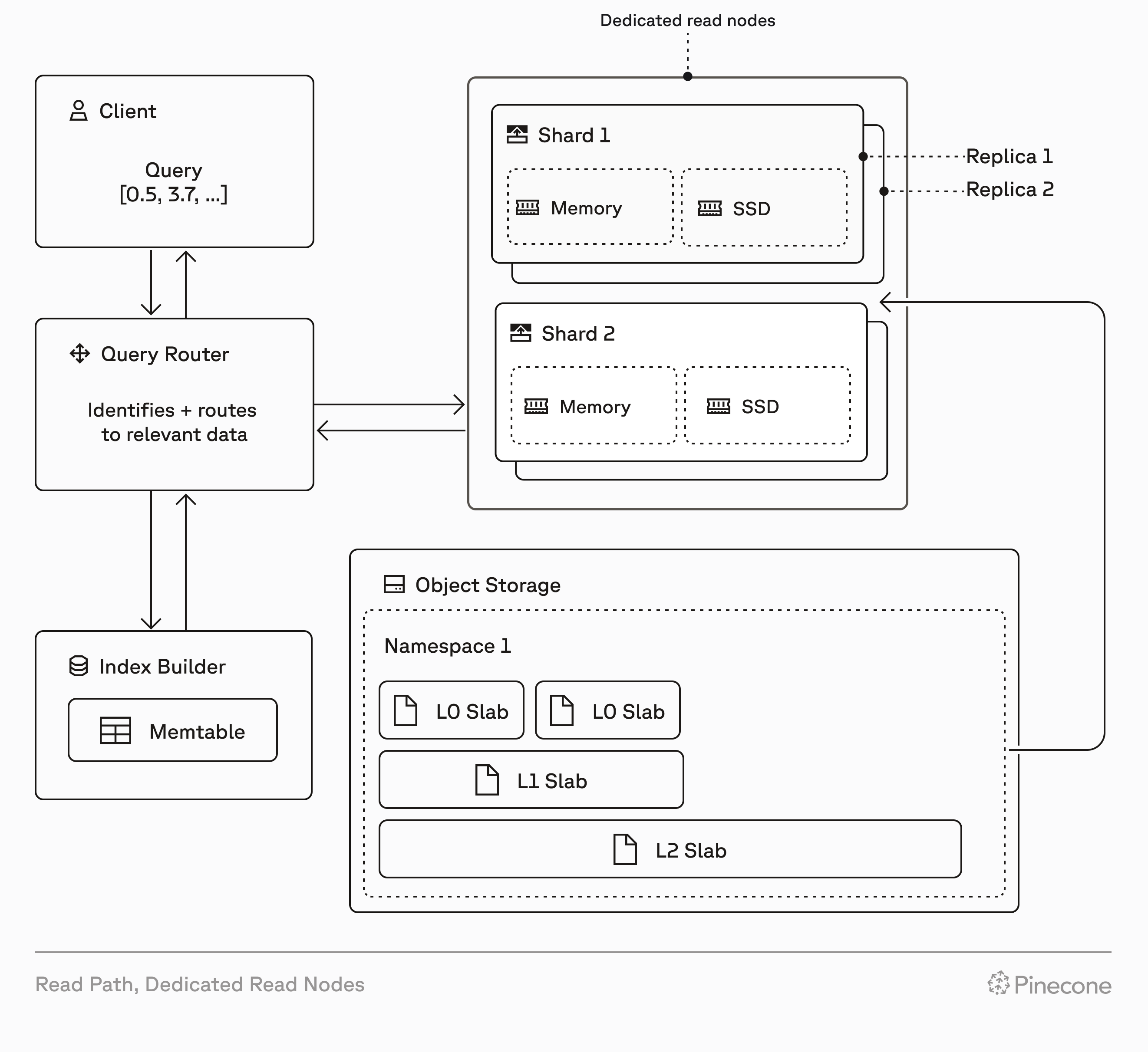
Dedicated read nodes differ from on-demand indexes in how they handle read operations. While on-demand indexes use shared, multi-tenant capacity for reads, dedicated read nodes provision exclusive hardware for reads: memory, local SSDs, and compute. Both index types use Pinecone's serverless infrastructure for writes and storage.
When you create a dedicated read nodes index, Pinecone provisions resources based on your choice of [node type](/guides/index-data/dedicated-read-nodes/concepts#node-types), number of [shards](/guides/index-data/dedicated-read-nodes/concepts#shards), and number of [replicas](/guides/index-data/dedicated-read-nodes/concepts#replicas). These resources include local SSDs and memory that cache all your index data, and provide dedicated query executors to handle read operations (query, fetch, list). This architecture eliminates cold starts and ensures consistent low-latency performance, even under heavy load.
Dedicated read nodes support dense, sparse, hybrid, and [full-text search](/guides/search/full-text-search) indexes, giving you flexibility in your search and retrieval strategy. Because storage (shards) and compute (replicas) scale independently, you can optimize for your specific workload characteristics.
 ## On-demand vs. dedicated read nodes
On-demand indexes and dedicated read nodes are both built on Pinecone's serverless infrastructure. They use the same write path, storage layer, and data operations API.
However, every dedicated read nodes index has isolated hardware for read operations (query, fetch, list), allowing these operations to run on dedicated query executors. This affects performance, cost, and how you scale:
| Feature | On-demand | Dedicated read nodes |
| :------------------ | :------------------------------------------------------------------------------------------------------------------------------------------------------------------------------------------------------- | :--------------------------------------------------------------------------------------------------------------------------------------------------------------------------------------------------------------------------- |
| Read infrastructure | Multi-tenant compute resources shared across customers | Isolated, provisioned query executors dedicated to your index |
| Read costs | Pay per [read unit](/guides/manage-cost/understanding-cost#read-units) (1 RU per 1 GB of namespace size per query, minimum 0.25 RU) | Fixed hourly rate for read capacity based on node type, shards, and replicas |
| Other costs | [Storage](/guides/manage-cost/understanding-cost#storage), [write](/guides/manage-cost/understanding-cost#write-units), and [egress](/guides/manage-cost/understanding-cost#egress) costs based on usage | [Storage](/guides/manage-cost/understanding-cost#storage), [write](/guides/manage-cost/understanding-cost#write-units), and [egress](/guides/manage-cost/understanding-cost#egress) costs based on usage (same as on-demand) |
| Caching | Best-effort; frequently accessed data is cached, but cold queries fetch from object storage | Guaranteed; all index data always warm in memory and on local SSDs |
| Read rate limits | [2,000 RU/second per index (adjustable)](/reference/api/database-limits/rate-limits) | No read rate limits (only bounded by CPU capacity) |
| Scaling | Automatic; Pinecone handles capacity | Manual; add [shards](/guides/index-data/dedicated-read-nodes/concepts#shards) for storage, add [replicas](/guides/index-data/dedicated-read-nodes/concepts#replicas) for throughput |
| Query-time tuning | Parameters accepted but have no effect | Optional [`scan_factor` and `max_candidates`](/guides/index-data/dedicated-read-nodes/tune-queries) to trade recall for lower latency and higher throughput |
| Best for | Variable workloads, multi-tenant applications with many namespaces, low to moderate query rates | Sustained high query rates, large single-namespace workloads, predictable performance and cost |
## When to use dedicated read nodes
Dedicated read nodes are ideal for workloads with millions to billions of records and predictable query rates. They provide performance and cost benefits compared to on-demand for high-throughput workloads, and may be required when your workload exceeds on-demand rate limits.
There's no universal formula for choosing between on-demand and dedicated read nodes. Performance and cost vary by workload (vector dimensionality, metadata filtering, and query patterns). Consider the following factors when making your decision:
With dedicated read nodes, you allocate dedicated read hardware for your index, and your data is cached in memory and on local SSDs. This provides:
* Consistent low latency under heavy load
* No cold starts (fetching data from object storage)
* Performance isolation from other workloads
* Linear scaling by adding replicas
* Predictable costs based on fixed hourly rates for provisioned hardware
If predictable performance and cost are critical for your application, dedicated read nodes may be a better fit than on-demand.
On-demand indexes are subject to [read unit rate limits](/reference/api/database-limits/rate-limits) (default: 2,000 RU/second per index).
A high query volume on a large index can exceed these limits. For example, a 15 GB namespace at 150 QPS requires approximately 2,250 RU/second (`15 RU per query × 150 QPS`), which exceeds the default rate limit.
Dedicated read nodes have no read rate limits and provide dedicated capacity for predictable QPS without throttling (bounded only by CPU capacity), making them better suited for high-throughput workloads.
Recommendation engines for use cases such as e-commerce and media require very high throughput and low latency to maintain positive user experiences. Dedicated read nodes are purpose-built for these use cases, providing:
* Consistent performance for thousands of queries per second
* Low latency for real-time recommendations
* Scalability to billion-vector datasets
* No performance degradation during traffic spikes
Similar requirements apply to other real-time use cases like semantic search at scale, personalization engines, and mission-critical services with strict performance SLOs.
Dedicated read nodes indexes support only a single namespace. If your application requires multiple namespaces, on-demand is a better fit.
To request early access to multi-namespace support, [contact support](https://app.pinecone.io/organizations/-/settings/support/ticket).
When not to use dedicated read nodes}>
On-demand indexes are better suited for workloads with unpredictable or highly variable traffic patterns. For example:
* RAG systems with variable query volumes
* Agentic applications with sporadic usage
* Prototypes and development environments with intermittent activity
* Scheduled jobs with infrequent, batch-style queries
Additionally, on-demand is better for indexes with many namespaces, even if you have high query volumes. Dedicated read nodes support single-namespace indexes only, so multi-tenant applications requiring namespace-based isolation should use on-demand.
For these scenarios, on-demand's elasticity and usage-based pricing provide better cost efficiency than provisioning dedicated capacity.
Dedicated read nodes *can* handle predictable traffic spikes efficiently if you scale replicas proactively via the API. For example, you can provision extra replicas before a scheduled email campaign and scale back down afterward.
On-demand and dedicated read nodes have different cost structures. The key difference is read costs: on-demand uses usage-based pricing, while dedicated read nodes use a fixed hourly rate based on provisioned hardware. Write, storage, and egress costs are usage-based for both modes.
Dedicated read nodes become cost-effective when you have predictable, sustained query volumes that make full use of your provisioned capacity. With unpredictable or low query volumes, you pay hourly rates even when your machines sit idle, making on-demand's usage-based pricing more economical.
For detailed cost information, comparison tables, and estimation tools, see the [Cost](#cost) section of this guide.
Performance depends on your specific workload: index size, vector dimensionality, metadata filtering, query patterns, throughput requirements, and latency requirements. Testing is the only way to know for sure whether dedicated read nodes are right for your scenario.
For a step-by-step guide to testing, see [Test your workload](/guides/index-data/dedicated-read-nodes/size-and-test#test-your-workload).
If you need guidance choosing a capacity mode (on-demand or dedicated read nodes) or sizing your index configuration, [contact us](https://www.pinecone.io/contact/).
## Limits
The following limits apply to dedicated read nodes:
### Read limits
Dedicated read nodes indexes aren't subject to [read-operation rate limits](/reference/api/database-limits/rate-limits), like on-demand indexes are. However, if your query rate exceeds the compute capacity of your index, you may observe decreased query throughput. In such cases, consider [adding replicas](/guides/index-data/dedicated-read-nodes/scale#add-or-remove-replicas) to increase compute resources, or use [query-time search parameters](/guides/index-data/dedicated-read-nodes/tune-queries) to reduce per-query compute and increase throughput without adding replicas.
### Write limits
On dedicated read nodes indexes, write operations (upsert, update, delete) have the same [rate limits](/reference/api/database-limits/rate-limits) as on-demand indexes.
Writes that would cause your index to exceed its storage capacity are blocked. In such cases, consider [adding shards](/guides/index-data/dedicated-read-nodes/scale#add-or-remove-shards) to increase available storage. To determine how close to the write limit you are, [check index fullness](/guides/index-data/dedicated-read-nodes/manage#monitor-index-fullness).
### Namespace limits
Dedicated read nodes indexes support a single namespace. To request early access to multi-namespace support, [contact support](https://app.pinecone.io/organizations/-/settings/support/ticket).
### Shard, replica, and node limits
| Resource | Limit |
| :-------------------------------------------------------------------- | :------------------------------------------------------------------------------------------------------------- |
| [Shards](/guides/index-data/dedicated-read-nodes/concepts#shards) | Minimum 1 per index |
| [Replicas](/guides/index-data/dedicated-read-nodes/concepts#replicas) | Minimum 0 per index, where 0 [pauses the index](/guides/index-data/dedicated-read-nodes/manage#pause-an-index) |
| [Nodes](/guides/index-data/dedicated-read-nodes/concepts#node-types) | Maximum 20 per project |
Nodes are a project-level limit, not a per-index limit. To calculate your total node count, multiply `shards × replicas` for each of your project's indexes, then sum the results; this total must not exceed 20. For example, two indexes that each have two shards and three replicas total `(2 × 3) + (2 × 3) = 12` nodes.
To increase your project's node limit, [contact support](https://app.pinecone.io/organizations/-/settings/support/ticket).
Configuration change limits:
* You can make one configuration change every ten minutes, but you can batch multiple changes (node type, shards, and replicas) in a single request.
* A new configuration change can only be initiated after the previous configuration change has completed.
* Each configuration change can take up to 30 minutes to complete.
* Read and write operations continue normally during configuration changes.
### Memory fullness
`memoryFullness` is an approximation and doesn't yet account for metadata. For more information, see [Index fullness](/guides/index-data/dedicated-read-nodes/concepts#index-fullness).
## Cost
For the latest pricing information, see the [Pinecone pricing page](https://www.pinecone.io/pricing/).
The cost of an index has four components: read costs, write costs, storage costs, and egress costs.
On-demand and dedicated read nodes share infrastructure for writes and storage, so these costs are the same. Egress is billed the same way on both, because it depends on the data returned to you rather than on the hardware serving the read. However, dedicated read nodes provision dedicated hardware for read operations (query, fetch, list), which changes how read costs are calculated.
| Cost component | On-demand | Dedicated read nodes |
| :------------- | :---------------------------------------------------------------------------------------------------------------------------------------------------------- | :------------------------------------------------------------------------------------------------------------------------------------------------------------------------------------------------------------------------------------------------- |
| Read costs | [Usage-based](/guides/manage-cost/understanding-cost#read-units): 1 RU per 1 GB namespace size per query | Fixed hourly rate: Based on [node type](/guides/index-data/dedicated-read-nodes/concepts#node-types), [shards](/guides/index-data/dedicated-read-nodes/concepts#shards), and [replicas](/guides/index-data/dedicated-read-nodes/concepts#replicas) |
| Write costs | [Usage-based](/guides/manage-cost/understanding-cost#write-units) | [Usage-based](/guides/manage-cost/understanding-cost#write-units) (same as on-demand) |
| Storage costs | [Usage-based](/guides/manage-cost/understanding-cost#storage) | [Usage-based](/guides/manage-cost/understanding-cost#storage) (same as on-demand) |
| Egress costs | [Usage-based](/guides/manage-cost/understanding-cost#egress) beyond your plan's [egress allowance](/guides/manage-cost/understanding-cost#egress-allowance) | [Usage-based](/guides/manage-cost/understanding-cost#egress) (same as on-demand) |
If you use a hosted model for search or reranking, there are additional [inference costs](https://www.pinecone.io/pricing).
### Calculate dedicated read nodes costs
To calculate the total cost of a dedicated read nodes index, use this formula:
```
(Node rate × shards × replicas) + storage costs + write costs + egress costs
```
| Term | Description |
| :------------ | :---------------------------------------------------------------------------------------------------------------------------------------------------------------------------------------------------- |
| Node rate | Monthly rate for the [node type](/guides/index-data/dedicated-read-nodes/concepts#node-types) (`b1` or `t1`), which varies by cloud region. See [Pinecone pricing](https://www.pinecone.io/pricing/). |
| Shards | Number of [shards](/guides/index-data/dedicated-read-nodes/concepts#shards) allocated |
| Replicas | Number of [replicas](/guides/index-data/dedicated-read-nodes/concepts#replicas) allocated |
| Storage costs | [Usage-based](/guides/manage-cost/understanding-cost#storage), same as on-demand |
| Write costs | [Usage-based](/guides/manage-cost/understanding-cost#write-units), same as on-demand |
| Egress costs | [Usage-based](/guides/manage-cost/understanding-cost#egress) beyond your plan's [egress allowance](/guides/manage-cost/understanding-cost#egress-allowance), same as on-demand |
For help estimating costs, use the [Pinecone pricing calculator](https://www.pinecone.io/pricing/estimate/) or [contact us](https://www.pinecone.io/contact/).
**Example:** If the rate for `b1` nodes on `aws-us-east-1` is \$336.42/month (\$0.46/hour), an index with two shards and two replicas would cost:
```
336.42 × 2 × 2 = $1,345.68/month, plus storage, write, and egress costs
```
## On-demand vs. dedicated read nodes
On-demand indexes and dedicated read nodes are both built on Pinecone's serverless infrastructure. They use the same write path, storage layer, and data operations API.
However, every dedicated read nodes index has isolated hardware for read operations (query, fetch, list), allowing these operations to run on dedicated query executors. This affects performance, cost, and how you scale:
| Feature | On-demand | Dedicated read nodes |
| :------------------ | :------------------------------------------------------------------------------------------------------------------------------------------------------------------------------------------------------- | :--------------------------------------------------------------------------------------------------------------------------------------------------------------------------------------------------------------------------- |
| Read infrastructure | Multi-tenant compute resources shared across customers | Isolated, provisioned query executors dedicated to your index |
| Read costs | Pay per [read unit](/guides/manage-cost/understanding-cost#read-units) (1 RU per 1 GB of namespace size per query, minimum 0.25 RU) | Fixed hourly rate for read capacity based on node type, shards, and replicas |
| Other costs | [Storage](/guides/manage-cost/understanding-cost#storage), [write](/guides/manage-cost/understanding-cost#write-units), and [egress](/guides/manage-cost/understanding-cost#egress) costs based on usage | [Storage](/guides/manage-cost/understanding-cost#storage), [write](/guides/manage-cost/understanding-cost#write-units), and [egress](/guides/manage-cost/understanding-cost#egress) costs based on usage (same as on-demand) |
| Caching | Best-effort; frequently accessed data is cached, but cold queries fetch from object storage | Guaranteed; all index data always warm in memory and on local SSDs |
| Read rate limits | [2,000 RU/second per index (adjustable)](/reference/api/database-limits/rate-limits) | No read rate limits (only bounded by CPU capacity) |
| Scaling | Automatic; Pinecone handles capacity | Manual; add [shards](/guides/index-data/dedicated-read-nodes/concepts#shards) for storage, add [replicas](/guides/index-data/dedicated-read-nodes/concepts#replicas) for throughput |
| Query-time tuning | Parameters accepted but have no effect | Optional [`scan_factor` and `max_candidates`](/guides/index-data/dedicated-read-nodes/tune-queries) to trade recall for lower latency and higher throughput |
| Best for | Variable workloads, multi-tenant applications with many namespaces, low to moderate query rates | Sustained high query rates, large single-namespace workloads, predictable performance and cost |
## When to use dedicated read nodes
Dedicated read nodes are ideal for workloads with millions to billions of records and predictable query rates. They provide performance and cost benefits compared to on-demand for high-throughput workloads, and may be required when your workload exceeds on-demand rate limits.
There's no universal formula for choosing between on-demand and dedicated read nodes. Performance and cost vary by workload (vector dimensionality, metadata filtering, and query patterns). Consider the following factors when making your decision:
With dedicated read nodes, you allocate dedicated read hardware for your index, and your data is cached in memory and on local SSDs. This provides:
* Consistent low latency under heavy load
* No cold starts (fetching data from object storage)
* Performance isolation from other workloads
* Linear scaling by adding replicas
* Predictable costs based on fixed hourly rates for provisioned hardware
If predictable performance and cost are critical for your application, dedicated read nodes may be a better fit than on-demand.
On-demand indexes are subject to [read unit rate limits](/reference/api/database-limits/rate-limits) (default: 2,000 RU/second per index).
A high query volume on a large index can exceed these limits. For example, a 15 GB namespace at 150 QPS requires approximately 2,250 RU/second (`15 RU per query × 150 QPS`), which exceeds the default rate limit.
Dedicated read nodes have no read rate limits and provide dedicated capacity for predictable QPS without throttling (bounded only by CPU capacity), making them better suited for high-throughput workloads.
Recommendation engines for use cases such as e-commerce and media require very high throughput and low latency to maintain positive user experiences. Dedicated read nodes are purpose-built for these use cases, providing:
* Consistent performance for thousands of queries per second
* Low latency for real-time recommendations
* Scalability to billion-vector datasets
* No performance degradation during traffic spikes
Similar requirements apply to other real-time use cases like semantic search at scale, personalization engines, and mission-critical services with strict performance SLOs.
Dedicated read nodes indexes support only a single namespace. If your application requires multiple namespaces, on-demand is a better fit.
To request early access to multi-namespace support, [contact support](https://app.pinecone.io/organizations/-/settings/support/ticket).
When not to use dedicated read nodes}>
On-demand indexes are better suited for workloads with unpredictable or highly variable traffic patterns. For example:
* RAG systems with variable query volumes
* Agentic applications with sporadic usage
* Prototypes and development environments with intermittent activity
* Scheduled jobs with infrequent, batch-style queries
Additionally, on-demand is better for indexes with many namespaces, even if you have high query volumes. Dedicated read nodes support single-namespace indexes only, so multi-tenant applications requiring namespace-based isolation should use on-demand.
For these scenarios, on-demand's elasticity and usage-based pricing provide better cost efficiency than provisioning dedicated capacity.
Dedicated read nodes *can* handle predictable traffic spikes efficiently if you scale replicas proactively via the API. For example, you can provision extra replicas before a scheduled email campaign and scale back down afterward.
On-demand and dedicated read nodes have different cost structures. The key difference is read costs: on-demand uses usage-based pricing, while dedicated read nodes use a fixed hourly rate based on provisioned hardware. Write, storage, and egress costs are usage-based for both modes.
Dedicated read nodes become cost-effective when you have predictable, sustained query volumes that make full use of your provisioned capacity. With unpredictable or low query volumes, you pay hourly rates even when your machines sit idle, making on-demand's usage-based pricing more economical.
For detailed cost information, comparison tables, and estimation tools, see the [Cost](#cost) section of this guide.
Performance depends on your specific workload: index size, vector dimensionality, metadata filtering, query patterns, throughput requirements, and latency requirements. Testing is the only way to know for sure whether dedicated read nodes are right for your scenario.
For a step-by-step guide to testing, see [Test your workload](/guides/index-data/dedicated-read-nodes/size-and-test#test-your-workload).
If you need guidance choosing a capacity mode (on-demand or dedicated read nodes) or sizing your index configuration, [contact us](https://www.pinecone.io/contact/).
## Limits
The following limits apply to dedicated read nodes:
### Read limits
Dedicated read nodes indexes aren't subject to [read-operation rate limits](/reference/api/database-limits/rate-limits), like on-demand indexes are. However, if your query rate exceeds the compute capacity of your index, you may observe decreased query throughput. In such cases, consider [adding replicas](/guides/index-data/dedicated-read-nodes/scale#add-or-remove-replicas) to increase compute resources, or use [query-time search parameters](/guides/index-data/dedicated-read-nodes/tune-queries) to reduce per-query compute and increase throughput without adding replicas.
### Write limits
On dedicated read nodes indexes, write operations (upsert, update, delete) have the same [rate limits](/reference/api/database-limits/rate-limits) as on-demand indexes.
Writes that would cause your index to exceed its storage capacity are blocked. In such cases, consider [adding shards](/guides/index-data/dedicated-read-nodes/scale#add-or-remove-shards) to increase available storage. To determine how close to the write limit you are, [check index fullness](/guides/index-data/dedicated-read-nodes/manage#monitor-index-fullness).
### Namespace limits
Dedicated read nodes indexes support a single namespace. To request early access to multi-namespace support, [contact support](https://app.pinecone.io/organizations/-/settings/support/ticket).
### Shard, replica, and node limits
| Resource | Limit |
| :-------------------------------------------------------------------- | :------------------------------------------------------------------------------------------------------------- |
| [Shards](/guides/index-data/dedicated-read-nodes/concepts#shards) | Minimum 1 per index |
| [Replicas](/guides/index-data/dedicated-read-nodes/concepts#replicas) | Minimum 0 per index, where 0 [pauses the index](/guides/index-data/dedicated-read-nodes/manage#pause-an-index) |
| [Nodes](/guides/index-data/dedicated-read-nodes/concepts#node-types) | Maximum 20 per project |
Nodes are a project-level limit, not a per-index limit. To calculate your total node count, multiply `shards × replicas` for each of your project's indexes, then sum the results; this total must not exceed 20. For example, two indexes that each have two shards and three replicas total `(2 × 3) + (2 × 3) = 12` nodes.
To increase your project's node limit, [contact support](https://app.pinecone.io/organizations/-/settings/support/ticket).
Configuration change limits:
* You can make one configuration change every ten minutes, but you can batch multiple changes (node type, shards, and replicas) in a single request.
* A new configuration change can only be initiated after the previous configuration change has completed.
* Each configuration change can take up to 30 minutes to complete.
* Read and write operations continue normally during configuration changes.
### Memory fullness
`memoryFullness` is an approximation and doesn't yet account for metadata. For more information, see [Index fullness](/guides/index-data/dedicated-read-nodes/concepts#index-fullness).
## Cost
For the latest pricing information, see the [Pinecone pricing page](https://www.pinecone.io/pricing/).
The cost of an index has four components: read costs, write costs, storage costs, and egress costs.
On-demand and dedicated read nodes share infrastructure for writes and storage, so these costs are the same. Egress is billed the same way on both, because it depends on the data returned to you rather than on the hardware serving the read. However, dedicated read nodes provision dedicated hardware for read operations (query, fetch, list), which changes how read costs are calculated.
| Cost component | On-demand | Dedicated read nodes |
| :------------- | :---------------------------------------------------------------------------------------------------------------------------------------------------------- | :------------------------------------------------------------------------------------------------------------------------------------------------------------------------------------------------------------------------------------------------- |
| Read costs | [Usage-based](/guides/manage-cost/understanding-cost#read-units): 1 RU per 1 GB namespace size per query | Fixed hourly rate: Based on [node type](/guides/index-data/dedicated-read-nodes/concepts#node-types), [shards](/guides/index-data/dedicated-read-nodes/concepts#shards), and [replicas](/guides/index-data/dedicated-read-nodes/concepts#replicas) |
| Write costs | [Usage-based](/guides/manage-cost/understanding-cost#write-units) | [Usage-based](/guides/manage-cost/understanding-cost#write-units) (same as on-demand) |
| Storage costs | [Usage-based](/guides/manage-cost/understanding-cost#storage) | [Usage-based](/guides/manage-cost/understanding-cost#storage) (same as on-demand) |
| Egress costs | [Usage-based](/guides/manage-cost/understanding-cost#egress) beyond your plan's [egress allowance](/guides/manage-cost/understanding-cost#egress-allowance) | [Usage-based](/guides/manage-cost/understanding-cost#egress) (same as on-demand) |
If you use a hosted model for search or reranking, there are additional [inference costs](https://www.pinecone.io/pricing).
### Calculate dedicated read nodes costs
To calculate the total cost of a dedicated read nodes index, use this formula:
```
(Node rate × shards × replicas) + storage costs + write costs + egress costs
```
| Term | Description |
| :------------ | :---------------------------------------------------------------------------------------------------------------------------------------------------------------------------------------------------- |
| Node rate | Monthly rate for the [node type](/guides/index-data/dedicated-read-nodes/concepts#node-types) (`b1` or `t1`), which varies by cloud region. See [Pinecone pricing](https://www.pinecone.io/pricing/). |
| Shards | Number of [shards](/guides/index-data/dedicated-read-nodes/concepts#shards) allocated |
| Replicas | Number of [replicas](/guides/index-data/dedicated-read-nodes/concepts#replicas) allocated |
| Storage costs | [Usage-based](/guides/manage-cost/understanding-cost#storage), same as on-demand |
| Write costs | [Usage-based](/guides/manage-cost/understanding-cost#write-units), same as on-demand |
| Egress costs | [Usage-based](/guides/manage-cost/understanding-cost#egress) beyond your plan's [egress allowance](/guides/manage-cost/understanding-cost#egress-allowance), same as on-demand |
For help estimating costs, use the [Pinecone pricing calculator](https://www.pinecone.io/pricing/estimate/) or [contact us](https://www.pinecone.io/contact/).
**Example:** If the rate for `b1` nodes on `aws-us-east-1` is \$336.42/month (\$0.46/hour), an index with two shards and two replicas would cost:
```
336.42 × 2 × 2 = $1,345.68/month, plus storage, write, and egress costs
```