> ## Documentation Index
> Fetch the complete documentation index at: https://docs.pinecone.io/llms.txt
> Use this file to discover all available pages before exploring further.
# Migrate a pod-based index to serverless
> Complete guide to migrating a Pinecone pod-based index to serverless. Serverless indexes offer better performance, automatic scaling, and usage-based pricing with no minimum spend.
This page shows you how to migrate a pod-based index to [serverless](/guides/get-started/database-architecture). The migration process is free; the standard costs of upserting records to a new serverless index are not applied.
In most cases, migrating to serverless reduces costs significantly. For read-heavy workloads with more than 1 query per second and for indexes with many records in a single namespace, consider building your serverless indexes on [dedicated read nodes](/guides/index-data/dedicated-read-nodes).
Before migrating, [contact Pinecone Support](/troubleshooting/contact-support) for help estimating and managing cost implications.
## Limitations
Migration is supported for pod-based indexes with less than 25 million records and 20,000 namespaces across all supported clouds (AWS, GCP, and Azure).
Also, serverless indexes do not support the following features. If you were using these features for your pod-based index, you will need to adapt your code. If you are blocked by these limitations, [contact Pinecone Support](/troubleshooting/contact-support).
* [Selective metadata indexing](/guides/indexes/pods/manage-pod-based-indexes#selective-metadata-indexing)
* Because high-cardinality metadata in serverless indexes does not cause high memory utilization, this operation is not relevant.
* [Filtering index statistics by metadata](/reference/api/latest/data-plane/describeindexstats)
## How it works
Migrating a pod-based index to serverless is a 2-step process:
After migration, you will have both a new serverless index and the original pod-based index. Once you've switched your workload to the serverless index, you can delete the pod-based index to avoid paying for unused resources.
## 1. Understand cost implications
In most cases, migrating to serverless reduces costs significantly. However, costs can increase for read-heavy workloads with more than 1 query per second and for indexes with many records in a single namespace.
Before migrating, consider [contacting Pinecone Support](/troubleshooting/contact-support) for help estimating and managing cost implications.
## 2. Prepare for migration
Migrating a pod-based index to serverless can take anywhere from a few minutes to several hours, depending on the size of the index. During that time, you can continue reading from the pod-based index. However, all [upserts](/guides/index-data/upsert-data), [updates](/guides/manage-data/update-data), and [deletes](/guides/manage-data/delete-data) to the pod-based index will not automatically be reflected in the new serverless index, so be sure to prepare in one of the following ways:
* **Pause write traffic:** If downtime is acceptable, pause traffic to the pod-based index before starting migration. After migration, you will start sending traffic to the serverless index.
* **Log your writes:** If you need to continue reading from the pod-based index during migration, send read traffic to the pod-based index, but log your writes to a temporary location outside of Pinecone (e.g., S3). After migration, you will replay the logged writes to the new serverless index and start sending all traffic to the serverless index.
## 3. Start migration
1. In the [Pinecone console](https://app.pinecone.io/), go to your pod-based index and click the **ellipsis (...) menu > Migrate to serverless**.
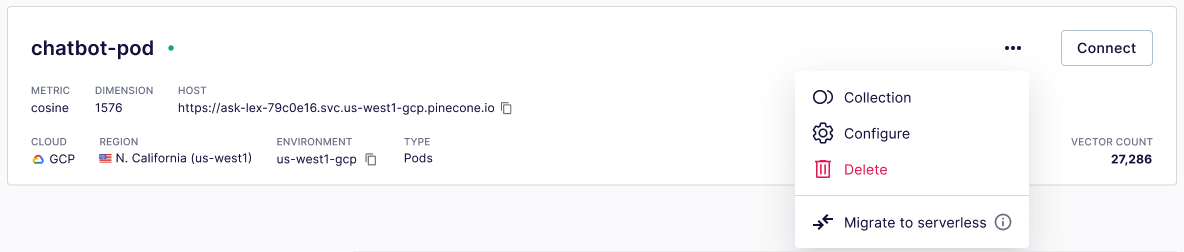 The dropdown will not display **Migrate to serverless** if the index has any of the listed [limitations](#limitations).
2. To save the legacy index and create a new serverless index now, follow the prompts.
Depending on the size of the index, migration can take anywhere from a few minutes to several hours. While migration is in progress, you'll see the yellow **Initializing** status:
The dropdown will not display **Migrate to serverless** if the index has any of the listed [limitations](#limitations).
2. To save the legacy index and create a new serverless index now, follow the prompts.
Depending on the size of the index, migration can take anywhere from a few minutes to several hours. While migration is in progress, you'll see the yellow **Initializing** status:
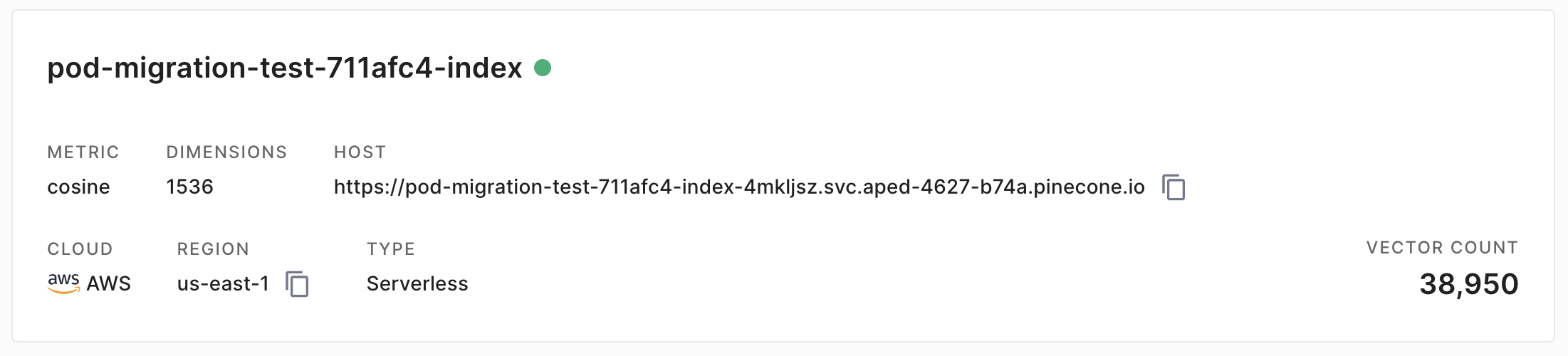
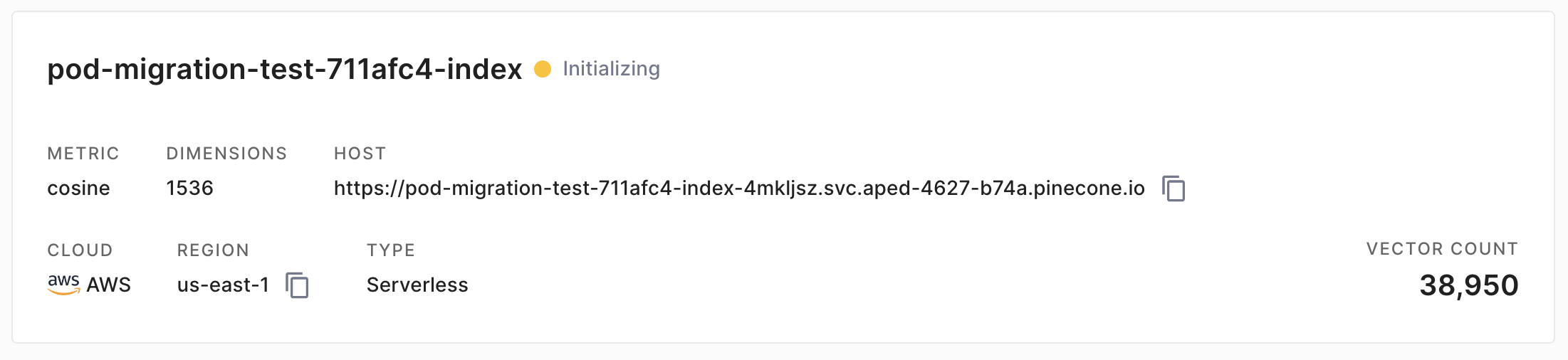 When the new serverless index is ready, the status will change to green:
 1. Use the [`create_collection`](/reference/api/latest/control-plane/create_collection) operation to create a backup of your pod-based index:
```javascript JavaScript theme={null}
// Requires Node.js SDK v6.1.2 or later
import { Pinecone } from '@pinecone-database/pinecone'
const pc = new Pinecone({
apiKey: 'YOUR_API_KEY'
});
await pc.createCollection({
name: "pod-collection",
source: "pod-index"
});
```
```go Go theme={null}
// Requires Go SDK v4.1.2 or later
package main
import (
"context"
"fmt"
"log"
"github.com/pinecone-io/go-pinecone/v4/pinecone"
)
func main() {
ctx := context.Background()
pc, err := pinecone.NewClient(pinecone.NewClientParams{
ApiKey: "YOUR_API_KEY",
})
if err != nil {
log.Fatalf("Failed to create Client: %v", err)
}
collection, err := pc.CreateCollection(ctx, &pinecone.CreateCollectionRequest{
Name: "pod-collection",
Source: "pod-index",
})
if err != nil {
log.Fatalf("Failed to create collection: %v", err)
} else {
fmt.Printf("Successfully created collection: %v", collection.Name)
}
}
```
```shell curl theme={null}
PINECONE_API_KEY="YOUR_API_KEY"
curl -s POST "https://api.pinecone.io/collections" \
-H "Accept: application/json" \
-H "Content-Type: application/json" \
-H "Api-Key: $PINECONE_API_KEY" \
-H "X-Pinecone-Api-Version: 2025-10" \
-d '{
"name": "pod-collection",
"source": "pod-index"
}'
```
2. Use the [`create_index`](/reference/api/latest/control-plane/create_index) operation to create a new serverless index from the collection:
* Use API verison `2025-04` or later. Creating a serverless index from a collection is not supported in earlier versions.
* Set `dimension` to the same dimension as the pod-based index. Changing the dimension is not supported.
* Set `cloud` to the cloud where the pod-based index is hosted. Migrating to a different cloud is not supported.
* Set `source_collection` to the name of the collection you created in step 1.
```javascript JavaScript theme={null}
import { Pinecone } from '@pinecone-database/pinecone'
const pc = new Pinecone({
apiKey: 'YOUR_API_KEY'
});
await pc.createIndex({
name: 'serverless-index',
vectorType: 'dense',
dimension: 1536,
metric: 'cosine',
spec: {
serverless: {
cloud: 'aws',
region: 'us-east-1',
sourceCollection: 'pod-collection'
}
}
});
```
```go Go theme={null}
package main
import (
"context"
"fmt"
"log"
"github.com/pinecone-io/go-pinecone/v4/pinecone"
)
func main() {
ctx := context.Background()
pc, err := pinecone.NewClient(pinecone.NewClientParams{
ApiKey: "YOUR_API_KEY",
})
if err != nil {
log.Fatalf("Failed to create Client: %v", err)
}
idx, err := pc.CreateServerlessIndex(ctx, &pinecone.CreateServerlessIndexRequest{
Name: "serverless-index",
VectorType: "dense",
Dimension: 1536,
Metric: pinecone.Cosine,
Cloud: pinecone.Aws,
Region: "us-east-1",
SourceCollection: "pod-collection",
})
if err != nil {
log.Fatalf("Failed to create serverless index: %v", err)
} else {
fmt.Printf("Successfully created serverless index: %v", idx.Name)
}
}
```
```shell curl theme={null}
PINECONE_API_KEY="YOUR_API_KEY"
curl -s "https://api.pinecone.io/indexes" \
-H "Accept: application/json" \
-H "Content-Type: application/json" \
-H "Api-Key: $PINECONE_API_KEY" \
-H "X-Pinecone-Api-Version: 2025-10" \
-d '{
"name": "serverless-index",
"vector_type": "dense",
"dimension": 1536,
"metric": "cosine",
"spec": {
"serverless": {
"cloud": "aws",
"region": "us-east-1",
"source_collection": "pod-collection"
}
}
}'
```
## 4. Update SDKs
If you are using an older version of the Python, Node.js, Java, or Go SDK, you must update the SDK to work with serverless indexes.
1. Check your SDK version:
```shell Python theme={null}
pip show pinecone
```
```shell JavaScript theme={null}
npm list | grep @pinecone-database/pinecone
```
```shell Java theme={null}
# Check your dependency file or classpath
```
```shell Go theme={null}
go list -u -m all | grep go-pinecone
```
2. If your SDK version is less than 3.0.0 for [Python](https://github.com/pinecone-io/pinecone-python-client), 2.0.0 for [Node.js](https://sdk.pinecone.io/typescript/), 1.0.0 for [Java](https://github.com/pinecone-io/pinecone-java-client), or 1.0.0 for [Go](https://github.com/pinecone-io/go-pinecone), upgrade the SDK as follows:
```Python Python theme={null}
pip install "pinecone[grpc]" --upgrade
```
```JavaScript JavaScript theme={null}
npm install @pinecone-database/pinecone@latest
```
```shell Java theme={null}
# Maven
io.pinecone
pinecone-client
5.0.0
# Gradle
implementation "io.pinecone:pinecone-client:5.0.0"
```
```go Go theme={null}
go get -u github.com/pinecone-io/go-pinecone/v4/pinecone@latest
```
If you are using the [.NET SDK](/reference/sdks/dotnet/overview), add a package reference to your project file:
```shell C# theme={null}
dotnet add package Pinecone.Client
```
## 5. Adapt existing code
You must make some minor code changes to work with serverless indexes.
Serverless indexes do not support some features, as outlined in [Limitations](#limitations). If you were relying on these features for your pod-based index, you’ll need to adapt your code.
1. Change how you import the Pinecone library and authenticate and initialize the client:
```Python Python theme={null}
from pinecone.grpc import PineconeGRPC as Pinecone
from pinecone import ServerlessSpec, PodSpec
# ServerlessSpec and PodSpec are required only when
# creating serverless and pod-based indexes.
pc = Pinecone(api_key="YOUR_API_KEY")
```
```JavaScript JavaScript theme={null}
import { Pinecone } from '@pinecone-database/pinecone';
const pc = new Pinecone({ apiKey: 'YOUR_API_KEY' });
```
```java Java theme={null}
import io.pinecone.clients.Pinecone;
import org.openapitools.db_control.client.model.*;
public class InitializeClientExample {
public static void main(String[] args) {
Pinecone pc = new Pinecone.Builder("YOUR_API_KEY").build();
}
}
```
```go Go theme={null}
package main
import (
"context"
"log"
"github.com/pinecone-io/go-pinecone/v4/pinecone"
)
func main() {
ctx := context.Background()
pc, err := pinecone.NewClient(pinecone.NewClientParams{
ApiKey: "YOUR_API_KEY",
})
if err != nil {
log.Fatalf("Failed to create Client: %v", err)
}
}
```
```csharp C# theme={null}
using Pinecone;
var pinecone = new PineconeClient("YOUR_API_KEY");
```
2. [Listing indexes](/guides/manage-data/manage-indexes) now fetches a complete description of each index. If you were relying on the output of this operation, you'll need to adapt your code.
```Python Python theme={null}
from pinecone.grpc import PineconeGRPC as Pinecone
pc = Pinecone(api_key="YOUR_API_KEY")
index_list = pc.list_indexes()
print(index_list)
```
```javascript JavaScript theme={null}
import { Pinecone } from '@pinecone-database/pinecone'
const pc = new Pinecone({ apiKey: 'YOUR_API_KEY' })
const indexList = await pc.listIndexes();
console.log(indexList);
```
```java Java theme={null}
import io.pinecone.clients.Pinecone;
import org.openapitools.db_control.client.model.*;
public class ListIndexesExample {
public static void main(String[] args) {
Pinecone pc = new Pinecone.Builder("YOUR_API_KEY").build();
IndexList indexList = pc.listIndexes();
System.out.println(indexList);
}
}
```
```go Go theme={null}
package main
import (
"context"
"encoding/json"
"fmt"
"log"
"github.com/pinecone-io/go-pinecone/v4/pinecone"
)
func prettifyStruct(obj interface{}) string {
bytes, _ := json.MarshalIndent(obj, "", " ")
return string(bytes)
}
func main() {
ctx := context.Background()
pc, err := pinecone.NewClient(pinecone.NewClientParams{
ApiKey: "YOUR_API_KEY",
})
if err != nil {
log.Fatalf("Failed to create Client: %v", err)
}
idxs, err := pc.ListIndexes(ctx)
if err != nil {
log.Fatalf("Failed to list indexes: %v", err)
} else {
for _, index := range idxs {
fmt.Printf("index: %v\n", prettifyStruct(index))
}
}
}
```
```csharp C# theme={null}
using Pinecone;
var pinecone = new PineconeClient("YOUR_API_KEY");
var indexList = await pinecone.ListIndexesAsync();
Console.WriteLine(indexList);
```
```shell curl theme={null}
PINECONE_API_KEY="YOUR_API_KEY"
curl -i -X GET "https://api.pinecone.io/indexes" \
-H "Api-Key: $PINECONE_API_KEY" \
-H "X-Pinecone-Api-Version: 2025-10"
```
The `list_indexes` operation now returns a response like the following:
```python Python theme={null}
[{
"name": "docs-example-sparse",
"metric": "dotproduct",
"host": "docs-example-sparse-govk0nt.svc.aped-4627-b74a.pinecone.io",
"spec": {
"serverless": {
"cloud": "aws",
"region": "us-east-1"
}
},
"status": {
"ready": true,
"state": "Ready"
},
"vector_type": "sparse",
"dimension": null,
"deletion_protection": "disabled",
"tags": {
"environment": "development"
}
}, {
"name": "docs-example-dense",
"metric": "cosine",
"host": "docs-example-dense-govk0nt.svc.aped-4627-b74a.pinecone.io",
"spec": {
"serverless": {
"cloud": "aws",
"region": "us-east-1"
}
},
"status": {
"ready": true,
"state": "Ready"
},
"vector_type": "dense",
"dimension": 1536,
"deletion_protection": "disabled",
"tags": {
"environment": "development"
}
}]
```
```javascript JavaScript theme={null}
{
indexes: [
{
name: 'docs-example-sparse',
dimension: undefined,
metric: 'dotproduct',
host: 'docs-example-sparse-govk0nt.svc.aped-4627-b74a.pinecone.io',
deletionProtection: 'disabled',
tags: { environment: 'development', example: 'tag' },
embed: undefined,
spec: { pod: undefined, serverless: { cloud: 'aws', region: 'us-east-1' } },
status: { ready: true, state: 'Ready' },
vectorType: 'sparse'
},
{
name: 'docs-example-dense',
dimension: 1536,
metric: 'cosine',
host: 'docs-example-dense-govk0nt.svc.aped-4627-b74a.pinecone.io',
deletionProtection: 'disabled',
tags: { environment: 'development', example: 'tag' },
embed: undefined,
spec: { pod: undefined, serverless: { cloud: 'aws', region: 'us-east-1' } },
status: { ready: true, state: 'Ready' },
vectorType: 'dense'
}
]
}
```
```java Java theme={null}
class IndexList {
indexes: [class IndexModel {
name: docs-example-sparse
dimension: null
metric: dotproduct
host: docs-example-sparse-govk0nt.svc.aped-4627-b74a.pinecone.io
deletionProtection: disabled
tags: {environment=development}
embed: null
spec: class IndexModelSpec {
pod: null
serverless: class ServerlessSpec {
cloud: aws
region: us-east-1
additionalProperties: null
}
additionalProperties: null
}
status: class IndexModelStatus {
ready: true
state: Ready
additionalProperties: null
}
vectorType: sparse
additionalProperties: null
}, class IndexModel {
name: docs-example-dense
dimension: 1536
metric: cosine
host: docs-example-dense-govk0nt.svc.aped-4627-b74a.pinecone.io
deletionProtection: disabled
tags: {environment=development}
embed: null
spec: class IndexModelSpec {
pod: null
serverless: class ServerlessSpec {
cloud: aws
region: us-east-1
additionalProperties: null
}
additionalProperties: null
}
status: class IndexModelStatus {
ready: true
state: Ready
additionalProperties: null
}
vectorType: dense
additionalProperties: null
}]
additionalProperties: null
}
```
```go Go theme={null}
index: {
"name": "docs-example-sparse",
"host": "docs-example-sparse-govk0nt.svc.aped-4627-b74a.pinecone.io",
"metric": "dotproduct",
"vector_type": "sparse",
"deletion_protection": "disabled",
"dimension": null,
"spec": {
"serverless": {
"cloud": "aws",
"region": "us-east-1"
}
},
"status": {
"ready": true,
"state": "Ready"
},
"tags": {
"environment": "development"
}
}
index: {
"name": "docs-example-dense",
"host": "docs-example-dense-govk0nt.svc.aped-4627-b74a.pinecone.io",
"metric": "cosine",
"vector_type": "dense",
"deletion_protection": "disabled",
"dimension": 1536,
"spec": {
"serverless": {
"cloud": "aws",
"region": "us-east-1"
}
},
"status": {
"ready": true,
"state": "Ready"
},
"tags": {
"environment": "development"
}
}
```
```csharp C# theme={null}
{
"indexes": [
{
"name": "docs-example-sparse",
"metric": "dotproduct",
"host": "docs-example-sparse-govk0nt.svc.aped-4627-b74a.pinecone.io",
"deletion_protection": "disabled",
"tags": {
"environment": "development"
},
"spec": {
"serverless": {
"cloud": "aws",
"region": "us-east-1"
}
},
"status": {
"ready": true,
"state": "Ready"
},
"vector_type": "sparse"
},
{
"name": "docs-example-dense",
"dimension": 1536,
"metric": "cosine",
"host": "docs-example-dense-govk0nt.svc.aped-4627-b74a.pinecone.io",
"deletion_protection": "disabled",
"tags": {
"environment": "development"
},
"spec": {
"serverless": {
"cloud": "aws",
"region": "us-east-1"
}
},
"status": {
"ready": true,
"state": "Ready"
},
"vector_type": "dense"
}
]
}
```
```json curl theme={null}
{
"indexes": [
{
"name": "docs-example-sparse",
"vector_type": "sparse",
"metric": "dotproduct",
"dimension": null,
"status": {
"ready": true,
"state": "Ready"
},
"host": "docs-example-sparse-govk0nt.svc.aped-4627-b74a.pinecone.io",
"spec": {
"serverless": {
"region": "us-east-1",
"cloud": "aws"
}
},
"deletion_protection": "disabled",
"tags": {
"environment": "development"
}
},
{
"name": "docs-example-dense",
"vector_type": "dense",
"metric": "cosine",
"dimension": 1536,
"status": {
"ready": true,
"state": "Ready"
},
"host": "docs-example-dense-govk0nt.svc.aped-4627-b74a.pinecone.io",
"spec": {
"serverless": {
"region": "us-east-1",
"cloud": "aws"
}
},
"deletion_protection": "disabled",
"tags": {
"environment": "development"
}
}
]
}
```
3. [Describing an index](/guides/manage-data/manage-indexes) now returns a description of an index in a different format. It also returns the index host needed to run data plane operations against the index. If you were relying on the output of this operation, you'll need to adapt your code.
```Python Python theme={null}
from pinecone.grpc import PineconeGRPC as Pinecone
pc = Pinecone(api_key="YOUR_API_KEY")
pc.describe_index(name="docs-example")
```
```JavaScript JavaScript theme={null}
import { Pinecone } from '@pinecone-database/pinecone';
const pc = new Pinecone({ apiKey: 'YOUR_API_KEY' });
await pc.describeIndex('docs-example');
```
```java Java theme={null}
import io.pinecone.clients.Pinecone;
import org.openapitools.db_control.client.model.*;
public class DescribeIndexExample {
public static void main(String[] args) {
Pinecone pc = new Pinecone.Builder("YOURE_API_KEY").build();
IndexModel indexModel = pc.describeIndex("docs-example");
System.out.println(indexModel);
}
}
```
```go Go theme={null}
package main
import (
"context"
"encoding/json"
"fmt"
"log"
"github.com/pinecone-io/go-pinecone/v4/pinecone"
)
func prettifyStruct(obj interface{}) string {
bytes, _ := json.MarshalIndent(obj, "", " ")
return string(bytes)
}
func main() {
ctx := context.Background()
pc, err := pinecone.NewClient(pinecone.NewClientParams{
ApiKey: "YOUR_API_KEY",
})
if err != nil {
log.Fatalf("Failed to create Client: %v", err)
}
idx, err := pc.DescribeIndex(ctx, "docs-example")
if err != nil {
log.Fatalf("Failed to describe index \"%v\": %v", idx.Name, err)
} else {
fmt.Printf("index: %v\n", prettifyStruct(idx))
}
}
```
```csharp C# theme={null}
using Pinecone;
var pinecone = new PineconeClient("YOUR_API_KEY");
var indexModel = await pinecone.DescribeIndexAsync("docs-example");
Console.WriteLine(indexModel);
```
```bash curl theme={null}
PINECONE_API_KEY="YOUR_API_KEY"
curl -i -X GET "https://api.pinecone.io/indexes/docs-example" \
-H "Api-Key: $PINECONE_API_KEY" \
-H "X-Pinecone-Api-Version: 2025-10"
```
## 6. Use your new index
When you're ready to cutover to your new serverless index:
1. Your new serverless index has a different name and unique endpoint than your pod-based index. Update your code to target the new serverless index:
```Python Python theme={null}
index = pc.Index("YOUR_SERVERLESS_INDEX_NAME")
```
```JavaScript JavaScript theme={null}
const index = pc.index("YOUR_SERVERLESS_INDEX_NAME");
```
```java Java theme={null}
import io.pinecone.clients.Index;
import io.pinecone.clients.Pinecone;
public class TargetIndexExample {
public static void main(String[] args) {
Pinecone pc = new Pinecone.Builder("YOUR_API_KEY").build();
Index index = pc.getIndexConnection("YOUR_SERVERLESS_INDEX_NAME");
```
```go Go theme={null}
package main
import (
"context"
"log"
"github.com/pinecone-io/go-pinecone/v4/pinecone"
)
func main() {
ctx := context.Background()
pc, err := pinecone.NewClient(pinecone.NewClientParams{
ApiKey: "YOUR_API_KEY",
})
if err != nil {
log.Fatalf("Failed to create Client: %v", err)
}
idx, err := pc.DescribeIndex(ctx, "YOUR_SERVERLESS_INDEX_NAME")
if err != nil {
log.Fatalf("Failed to describe index \"%v\": %v", idx.Name, err)
}
idxConnection, err := pc.Index(pinecone.NewIndexConnParams{Host: idx.Host, Namespace: "example-namespace"})
if err != nil {
log.Fatalf("Failed to create IndexConnection for Host %v: %v", idx.Host, err)
}
}
```
```csharp C# theme={null}
using Pinecone;
var pinecone = new PineconeClient("YOUR_API_KEY");
var index = pinecone.Index("YOUR_SERVERLESS_INDEX_NAME");
```
```bash curl theme={null}
# When using the API directly, you need the unique endpoint for your new serverless index.
# See https://docs.pinecone.io/guides/manage-data/target-an-index for details.
PINECONE_API_KEY="YOUR_API_KEY"
INDEX_HOST="INDEX_HOST"
curl -X POST "https://$INDEX_HOST/describe_index_stats" \
-H "Api-Key: $PINECONE_API_KEY" \
-H "X-Pinecone-Api-Version: 2025-10"
```
2. Reinitialize your clients.
3. If you logged writes to the pod-based index during migration, replay the logged writes to your serverless index.
4. [Delete the pod-based index](/guides/manage-data/manage-indexes#delete-an-index) to avoid paying for unused resources.
It is not possible to save a serverless index as a collection, so if you want to retain the option to recreate your pod-based index, be sure to keep the collection you created earlier.
## See also
* [Limits](/reference/api/database-limits)
* [Serverless architecture](/guides/get-started/database-architecture)
* [Understanding serverless cost](/guides/manage-cost/understanding-cost)
1. Use the [`create_collection`](/reference/api/latest/control-plane/create_collection) operation to create a backup of your pod-based index:
```javascript JavaScript theme={null}
// Requires Node.js SDK v6.1.2 or later
import { Pinecone } from '@pinecone-database/pinecone'
const pc = new Pinecone({
apiKey: 'YOUR_API_KEY'
});
await pc.createCollection({
name: "pod-collection",
source: "pod-index"
});
```
```go Go theme={null}
// Requires Go SDK v4.1.2 or later
package main
import (
"context"
"fmt"
"log"
"github.com/pinecone-io/go-pinecone/v4/pinecone"
)
func main() {
ctx := context.Background()
pc, err := pinecone.NewClient(pinecone.NewClientParams{
ApiKey: "YOUR_API_KEY",
})
if err != nil {
log.Fatalf("Failed to create Client: %v", err)
}
collection, err := pc.CreateCollection(ctx, &pinecone.CreateCollectionRequest{
Name: "pod-collection",
Source: "pod-index",
})
if err != nil {
log.Fatalf("Failed to create collection: %v", err)
} else {
fmt.Printf("Successfully created collection: %v", collection.Name)
}
}
```
```shell curl theme={null}
PINECONE_API_KEY="YOUR_API_KEY"
curl -s POST "https://api.pinecone.io/collections" \
-H "Accept: application/json" \
-H "Content-Type: application/json" \
-H "Api-Key: $PINECONE_API_KEY" \
-H "X-Pinecone-Api-Version: 2025-10" \
-d '{
"name": "pod-collection",
"source": "pod-index"
}'
```
2. Use the [`create_index`](/reference/api/latest/control-plane/create_index) operation to create a new serverless index from the collection:
* Use API verison `2025-04` or later. Creating a serverless index from a collection is not supported in earlier versions.
* Set `dimension` to the same dimension as the pod-based index. Changing the dimension is not supported.
* Set `cloud` to the cloud where the pod-based index is hosted. Migrating to a different cloud is not supported.
* Set `source_collection` to the name of the collection you created in step 1.
```javascript JavaScript theme={null}
import { Pinecone } from '@pinecone-database/pinecone'
const pc = new Pinecone({
apiKey: 'YOUR_API_KEY'
});
await pc.createIndex({
name: 'serverless-index',
vectorType: 'dense',
dimension: 1536,
metric: 'cosine',
spec: {
serverless: {
cloud: 'aws',
region: 'us-east-1',
sourceCollection: 'pod-collection'
}
}
});
```
```go Go theme={null}
package main
import (
"context"
"fmt"
"log"
"github.com/pinecone-io/go-pinecone/v4/pinecone"
)
func main() {
ctx := context.Background()
pc, err := pinecone.NewClient(pinecone.NewClientParams{
ApiKey: "YOUR_API_KEY",
})
if err != nil {
log.Fatalf("Failed to create Client: %v", err)
}
idx, err := pc.CreateServerlessIndex(ctx, &pinecone.CreateServerlessIndexRequest{
Name: "serverless-index",
VectorType: "dense",
Dimension: 1536,
Metric: pinecone.Cosine,
Cloud: pinecone.Aws,
Region: "us-east-1",
SourceCollection: "pod-collection",
})
if err != nil {
log.Fatalf("Failed to create serverless index: %v", err)
} else {
fmt.Printf("Successfully created serverless index: %v", idx.Name)
}
}
```
```shell curl theme={null}
PINECONE_API_KEY="YOUR_API_KEY"
curl -s "https://api.pinecone.io/indexes" \
-H "Accept: application/json" \
-H "Content-Type: application/json" \
-H "Api-Key: $PINECONE_API_KEY" \
-H "X-Pinecone-Api-Version: 2025-10" \
-d '{
"name": "serverless-index",
"vector_type": "dense",
"dimension": 1536,
"metric": "cosine",
"spec": {
"serverless": {
"cloud": "aws",
"region": "us-east-1",
"source_collection": "pod-collection"
}
}
}'
```
## 4. Update SDKs
If you are using an older version of the Python, Node.js, Java, or Go SDK, you must update the SDK to work with serverless indexes.
1. Check your SDK version:
```shell Python theme={null}
pip show pinecone
```
```shell JavaScript theme={null}
npm list | grep @pinecone-database/pinecone
```
```shell Java theme={null}
# Check your dependency file or classpath
```
```shell Go theme={null}
go list -u -m all | grep go-pinecone
```
2. If your SDK version is less than 3.0.0 for [Python](https://github.com/pinecone-io/pinecone-python-client), 2.0.0 for [Node.js](https://sdk.pinecone.io/typescript/), 1.0.0 for [Java](https://github.com/pinecone-io/pinecone-java-client), or 1.0.0 for [Go](https://github.com/pinecone-io/go-pinecone), upgrade the SDK as follows:
```Python Python theme={null}
pip install "pinecone[grpc]" --upgrade
```
```JavaScript JavaScript theme={null}
npm install @pinecone-database/pinecone@latest
```
```shell Java theme={null}
# Maven
io.pinecone
pinecone-client
5.0.0
# Gradle
implementation "io.pinecone:pinecone-client:5.0.0"
```
```go Go theme={null}
go get -u github.com/pinecone-io/go-pinecone/v4/pinecone@latest
```
If you are using the [.NET SDK](/reference/sdks/dotnet/overview), add a package reference to your project file:
```shell C# theme={null}
dotnet add package Pinecone.Client
```
## 5. Adapt existing code
You must make some minor code changes to work with serverless indexes.
Serverless indexes do not support some features, as outlined in [Limitations](#limitations). If you were relying on these features for your pod-based index, you’ll need to adapt your code.
1. Change how you import the Pinecone library and authenticate and initialize the client:
```Python Python theme={null}
from pinecone.grpc import PineconeGRPC as Pinecone
from pinecone import ServerlessSpec, PodSpec
# ServerlessSpec and PodSpec are required only when
# creating serverless and pod-based indexes.
pc = Pinecone(api_key="YOUR_API_KEY")
```
```JavaScript JavaScript theme={null}
import { Pinecone } from '@pinecone-database/pinecone';
const pc = new Pinecone({ apiKey: 'YOUR_API_KEY' });
```
```java Java theme={null}
import io.pinecone.clients.Pinecone;
import org.openapitools.db_control.client.model.*;
public class InitializeClientExample {
public static void main(String[] args) {
Pinecone pc = new Pinecone.Builder("YOUR_API_KEY").build();
}
}
```
```go Go theme={null}
package main
import (
"context"
"log"
"github.com/pinecone-io/go-pinecone/v4/pinecone"
)
func main() {
ctx := context.Background()
pc, err := pinecone.NewClient(pinecone.NewClientParams{
ApiKey: "YOUR_API_KEY",
})
if err != nil {
log.Fatalf("Failed to create Client: %v", err)
}
}
```
```csharp C# theme={null}
using Pinecone;
var pinecone = new PineconeClient("YOUR_API_KEY");
```
2. [Listing indexes](/guides/manage-data/manage-indexes) now fetches a complete description of each index. If you were relying on the output of this operation, you'll need to adapt your code.
```Python Python theme={null}
from pinecone.grpc import PineconeGRPC as Pinecone
pc = Pinecone(api_key="YOUR_API_KEY")
index_list = pc.list_indexes()
print(index_list)
```
```javascript JavaScript theme={null}
import { Pinecone } from '@pinecone-database/pinecone'
const pc = new Pinecone({ apiKey: 'YOUR_API_KEY' })
const indexList = await pc.listIndexes();
console.log(indexList);
```
```java Java theme={null}
import io.pinecone.clients.Pinecone;
import org.openapitools.db_control.client.model.*;
public class ListIndexesExample {
public static void main(String[] args) {
Pinecone pc = new Pinecone.Builder("YOUR_API_KEY").build();
IndexList indexList = pc.listIndexes();
System.out.println(indexList);
}
}
```
```go Go theme={null}
package main
import (
"context"
"encoding/json"
"fmt"
"log"
"github.com/pinecone-io/go-pinecone/v4/pinecone"
)
func prettifyStruct(obj interface{}) string {
bytes, _ := json.MarshalIndent(obj, "", " ")
return string(bytes)
}
func main() {
ctx := context.Background()
pc, err := pinecone.NewClient(pinecone.NewClientParams{
ApiKey: "YOUR_API_KEY",
})
if err != nil {
log.Fatalf("Failed to create Client: %v", err)
}
idxs, err := pc.ListIndexes(ctx)
if err != nil {
log.Fatalf("Failed to list indexes: %v", err)
} else {
for _, index := range idxs {
fmt.Printf("index: %v\n", prettifyStruct(index))
}
}
}
```
```csharp C# theme={null}
using Pinecone;
var pinecone = new PineconeClient("YOUR_API_KEY");
var indexList = await pinecone.ListIndexesAsync();
Console.WriteLine(indexList);
```
```shell curl theme={null}
PINECONE_API_KEY="YOUR_API_KEY"
curl -i -X GET "https://api.pinecone.io/indexes" \
-H "Api-Key: $PINECONE_API_KEY" \
-H "X-Pinecone-Api-Version: 2025-10"
```
The `list_indexes` operation now returns a response like the following:
```python Python theme={null}
[{
"name": "docs-example-sparse",
"metric": "dotproduct",
"host": "docs-example-sparse-govk0nt.svc.aped-4627-b74a.pinecone.io",
"spec": {
"serverless": {
"cloud": "aws",
"region": "us-east-1"
}
},
"status": {
"ready": true,
"state": "Ready"
},
"vector_type": "sparse",
"dimension": null,
"deletion_protection": "disabled",
"tags": {
"environment": "development"
}
}, {
"name": "docs-example-dense",
"metric": "cosine",
"host": "docs-example-dense-govk0nt.svc.aped-4627-b74a.pinecone.io",
"spec": {
"serverless": {
"cloud": "aws",
"region": "us-east-1"
}
},
"status": {
"ready": true,
"state": "Ready"
},
"vector_type": "dense",
"dimension": 1536,
"deletion_protection": "disabled",
"tags": {
"environment": "development"
}
}]
```
```javascript JavaScript theme={null}
{
indexes: [
{
name: 'docs-example-sparse',
dimension: undefined,
metric: 'dotproduct',
host: 'docs-example-sparse-govk0nt.svc.aped-4627-b74a.pinecone.io',
deletionProtection: 'disabled',
tags: { environment: 'development', example: 'tag' },
embed: undefined,
spec: { pod: undefined, serverless: { cloud: 'aws', region: 'us-east-1' } },
status: { ready: true, state: 'Ready' },
vectorType: 'sparse'
},
{
name: 'docs-example-dense',
dimension: 1536,
metric: 'cosine',
host: 'docs-example-dense-govk0nt.svc.aped-4627-b74a.pinecone.io',
deletionProtection: 'disabled',
tags: { environment: 'development', example: 'tag' },
embed: undefined,
spec: { pod: undefined, serverless: { cloud: 'aws', region: 'us-east-1' } },
status: { ready: true, state: 'Ready' },
vectorType: 'dense'
}
]
}
```
```java Java theme={null}
class IndexList {
indexes: [class IndexModel {
name: docs-example-sparse
dimension: null
metric: dotproduct
host: docs-example-sparse-govk0nt.svc.aped-4627-b74a.pinecone.io
deletionProtection: disabled
tags: {environment=development}
embed: null
spec: class IndexModelSpec {
pod: null
serverless: class ServerlessSpec {
cloud: aws
region: us-east-1
additionalProperties: null
}
additionalProperties: null
}
status: class IndexModelStatus {
ready: true
state: Ready
additionalProperties: null
}
vectorType: sparse
additionalProperties: null
}, class IndexModel {
name: docs-example-dense
dimension: 1536
metric: cosine
host: docs-example-dense-govk0nt.svc.aped-4627-b74a.pinecone.io
deletionProtection: disabled
tags: {environment=development}
embed: null
spec: class IndexModelSpec {
pod: null
serverless: class ServerlessSpec {
cloud: aws
region: us-east-1
additionalProperties: null
}
additionalProperties: null
}
status: class IndexModelStatus {
ready: true
state: Ready
additionalProperties: null
}
vectorType: dense
additionalProperties: null
}]
additionalProperties: null
}
```
```go Go theme={null}
index: {
"name": "docs-example-sparse",
"host": "docs-example-sparse-govk0nt.svc.aped-4627-b74a.pinecone.io",
"metric": "dotproduct",
"vector_type": "sparse",
"deletion_protection": "disabled",
"dimension": null,
"spec": {
"serverless": {
"cloud": "aws",
"region": "us-east-1"
}
},
"status": {
"ready": true,
"state": "Ready"
},
"tags": {
"environment": "development"
}
}
index: {
"name": "docs-example-dense",
"host": "docs-example-dense-govk0nt.svc.aped-4627-b74a.pinecone.io",
"metric": "cosine",
"vector_type": "dense",
"deletion_protection": "disabled",
"dimension": 1536,
"spec": {
"serverless": {
"cloud": "aws",
"region": "us-east-1"
}
},
"status": {
"ready": true,
"state": "Ready"
},
"tags": {
"environment": "development"
}
}
```
```csharp C# theme={null}
{
"indexes": [
{
"name": "docs-example-sparse",
"metric": "dotproduct",
"host": "docs-example-sparse-govk0nt.svc.aped-4627-b74a.pinecone.io",
"deletion_protection": "disabled",
"tags": {
"environment": "development"
},
"spec": {
"serverless": {
"cloud": "aws",
"region": "us-east-1"
}
},
"status": {
"ready": true,
"state": "Ready"
},
"vector_type": "sparse"
},
{
"name": "docs-example-dense",
"dimension": 1536,
"metric": "cosine",
"host": "docs-example-dense-govk0nt.svc.aped-4627-b74a.pinecone.io",
"deletion_protection": "disabled",
"tags": {
"environment": "development"
},
"spec": {
"serverless": {
"cloud": "aws",
"region": "us-east-1"
}
},
"status": {
"ready": true,
"state": "Ready"
},
"vector_type": "dense"
}
]
}
```
```json curl theme={null}
{
"indexes": [
{
"name": "docs-example-sparse",
"vector_type": "sparse",
"metric": "dotproduct",
"dimension": null,
"status": {
"ready": true,
"state": "Ready"
},
"host": "docs-example-sparse-govk0nt.svc.aped-4627-b74a.pinecone.io",
"spec": {
"serverless": {
"region": "us-east-1",
"cloud": "aws"
}
},
"deletion_protection": "disabled",
"tags": {
"environment": "development"
}
},
{
"name": "docs-example-dense",
"vector_type": "dense",
"metric": "cosine",
"dimension": 1536,
"status": {
"ready": true,
"state": "Ready"
},
"host": "docs-example-dense-govk0nt.svc.aped-4627-b74a.pinecone.io",
"spec": {
"serverless": {
"region": "us-east-1",
"cloud": "aws"
}
},
"deletion_protection": "disabled",
"tags": {
"environment": "development"
}
}
]
}
```
3. [Describing an index](/guides/manage-data/manage-indexes) now returns a description of an index in a different format. It also returns the index host needed to run data plane operations against the index. If you were relying on the output of this operation, you'll need to adapt your code.
```Python Python theme={null}
from pinecone.grpc import PineconeGRPC as Pinecone
pc = Pinecone(api_key="YOUR_API_KEY")
pc.describe_index(name="docs-example")
```
```JavaScript JavaScript theme={null}
import { Pinecone } from '@pinecone-database/pinecone';
const pc = new Pinecone({ apiKey: 'YOUR_API_KEY' });
await pc.describeIndex('docs-example');
```
```java Java theme={null}
import io.pinecone.clients.Pinecone;
import org.openapitools.db_control.client.model.*;
public class DescribeIndexExample {
public static void main(String[] args) {
Pinecone pc = new Pinecone.Builder("YOURE_API_KEY").build();
IndexModel indexModel = pc.describeIndex("docs-example");
System.out.println(indexModel);
}
}
```
```go Go theme={null}
package main
import (
"context"
"encoding/json"
"fmt"
"log"
"github.com/pinecone-io/go-pinecone/v4/pinecone"
)
func prettifyStruct(obj interface{}) string {
bytes, _ := json.MarshalIndent(obj, "", " ")
return string(bytes)
}
func main() {
ctx := context.Background()
pc, err := pinecone.NewClient(pinecone.NewClientParams{
ApiKey: "YOUR_API_KEY",
})
if err != nil {
log.Fatalf("Failed to create Client: %v", err)
}
idx, err := pc.DescribeIndex(ctx, "docs-example")
if err != nil {
log.Fatalf("Failed to describe index \"%v\": %v", idx.Name, err)
} else {
fmt.Printf("index: %v\n", prettifyStruct(idx))
}
}
```
```csharp C# theme={null}
using Pinecone;
var pinecone = new PineconeClient("YOUR_API_KEY");
var indexModel = await pinecone.DescribeIndexAsync("docs-example");
Console.WriteLine(indexModel);
```
```bash curl theme={null}
PINECONE_API_KEY="YOUR_API_KEY"
curl -i -X GET "https://api.pinecone.io/indexes/docs-example" \
-H "Api-Key: $PINECONE_API_KEY" \
-H "X-Pinecone-Api-Version: 2025-10"
```
## 6. Use your new index
When you're ready to cutover to your new serverless index:
1. Your new serverless index has a different name and unique endpoint than your pod-based index. Update your code to target the new serverless index:
```Python Python theme={null}
index = pc.Index("YOUR_SERVERLESS_INDEX_NAME")
```
```JavaScript JavaScript theme={null}
const index = pc.index("YOUR_SERVERLESS_INDEX_NAME");
```
```java Java theme={null}
import io.pinecone.clients.Index;
import io.pinecone.clients.Pinecone;
public class TargetIndexExample {
public static void main(String[] args) {
Pinecone pc = new Pinecone.Builder("YOUR_API_KEY").build();
Index index = pc.getIndexConnection("YOUR_SERVERLESS_INDEX_NAME");
```
```go Go theme={null}
package main
import (
"context"
"log"
"github.com/pinecone-io/go-pinecone/v4/pinecone"
)
func main() {
ctx := context.Background()
pc, err := pinecone.NewClient(pinecone.NewClientParams{
ApiKey: "YOUR_API_KEY",
})
if err != nil {
log.Fatalf("Failed to create Client: %v", err)
}
idx, err := pc.DescribeIndex(ctx, "YOUR_SERVERLESS_INDEX_NAME")
if err != nil {
log.Fatalf("Failed to describe index \"%v\": %v", idx.Name, err)
}
idxConnection, err := pc.Index(pinecone.NewIndexConnParams{Host: idx.Host, Namespace: "example-namespace"})
if err != nil {
log.Fatalf("Failed to create IndexConnection for Host %v: %v", idx.Host, err)
}
}
```
```csharp C# theme={null}
using Pinecone;
var pinecone = new PineconeClient("YOUR_API_KEY");
var index = pinecone.Index("YOUR_SERVERLESS_INDEX_NAME");
```
```bash curl theme={null}
# When using the API directly, you need the unique endpoint for your new serverless index.
# See https://docs.pinecone.io/guides/manage-data/target-an-index for details.
PINECONE_API_KEY="YOUR_API_KEY"
INDEX_HOST="INDEX_HOST"
curl -X POST "https://$INDEX_HOST/describe_index_stats" \
-H "Api-Key: $PINECONE_API_KEY" \
-H "X-Pinecone-Api-Version: 2025-10"
```
2. Reinitialize your clients.
3. If you logged writes to the pod-based index during migration, replay the logged writes to your serverless index.
4. [Delete the pod-based index](/guides/manage-data/manage-indexes#delete-an-index) to avoid paying for unused resources.
It is not possible to save a serverless index as a collection, so if you want to retain the option to recreate your pod-based index, be sure to keep the collection you created earlier.
## See also
* [Limits](/reference/api/database-limits)
* [Serverless architecture](/guides/get-started/database-architecture)
* [Understanding serverless cost](/guides/manage-cost/understanding-cost)