

Organization
An organization is a group of one or more projects that use the same billing. Organizations allow one or more users to control billing and permissions for all of the projects belonging to the organization. For more information, see Organizations overview.Project
A project belongs to an organization and contains one or more indexes. Each project belongs to exactly one organization, but only users who belong to the project can access the indexes in that project. API keys and Assistants are project-specific. For more information, see Projects overview.Index
Pinecone serverless indexes hold your data as documents or records, depending on how the index was created: an index created with a document schema (a document index) holds documents, while an index created with a dense or sparse vector type (a vector index) holds records. A document is a JSON object with ranking fields that Pinecone indexes according to a schema you define, plus any number of metadata fields. A single index with a document schema can mix multiple ranking field types: adense_vector field for semantic search, a sparse_vector field for sparse-vector retrieval, and one or more string fields with full_text_search enabled for full-text search with BM25 and Lucene queries. Metadata fields (anything else you upsert) are auto-indexed for filtering at upsert time, no schema declaration required.
One index per use case is the typical pattern. Because a document can combine vectors, text, and metadata in the same record, a single index often covers what previously required two. Pick the ranking signal per query with score_by.
Full-text search
Full-text search is BM25 token matching with Lucene query syntax over text fields in your schema,string fields you’ve declared with full_text_search so their content is indexed for token-level retrieval. “Text field” is the colloquial name; the JSON type is string. No model required: Pinecone handles tokenization, IDF, and length normalization at index time and BM25 scoring at query time. “Token” here means a unit produced by Pinecone’s text analyzer (whitespace + punctuation split, lowercased, optionally stemmed), not the subword unit a dense or sparse embedding model uses internally. See Tokens and analyzers for the full pipeline.
How it works:
- You upsert data as JSON documents.
- You declare each ranking field’s type in the index schema:
dense_vector,sparse_vector, orstringwithfull_text_search(indexed for BM25 ranking and Lucene queries). Metadata fields aren’t declared in the schema. - Pinecone indexes each ranking field according to its declared type and auto-indexes any other fields on the document for metadata filtering.
score_by. The literal value of type selects the method: text (BM25 token matching over one or more text fields), query_string (Lucene query syntax across one or more text fields, including cross-field boolean queries), dense_vector (vector similarity), or sparse_vector (sparse-vector similarity). Any scoring method can be combined with metadata filters, including logical operators ($and, $or, $not), existence checks ($exists), and the text-match operators ($match_phrase, $match_all, $match_any) for phrase and token matching against text fields.
Use full-text search for keyword and phrase search over text content — product names, identifiers, technical terms, code, and other cases where queries and documents share specific tokens. For sparse-vector retrieval with a learned encoder (such as pinecone-sparse-english-v0), see Index with sparse vectors. For semantic similarity over natural-language queries, see Index with dense vectors.
Learn more:
Index with dense vectors
These indexes store records that each have one dense vector. A dense vector is a series of numbers that represent the meaning and relationships of text, images, or other data. Each vector is a point in a multidimensional space; each number is a coordinate in that space. Vectors that are closer together in that space are semantically similar. When you query an index with dense vectors, Pinecone retrieves records whose vectors are most semantically similar to the query. This is often called semantic search, nearest neighbor search, similarity search, or just vector search. Records that also carry a sparse vector support single-index hybrid search on the Vectors API.Index with sparse vectors
These indexes store records that each have one sparse vector, a vector with very high dimensionality but only a small number of non-zero values. Each dimension typically corresponds to a token in a vocabulary; the non-zero values represent the importance of those tokens in a document. When you search an index with sparse vectors, Pinecone retrieves records whose vectors share the most weighted tokens with the query vector. This is often called sparse-vector retrieval or sparse-vector search. Sparse vectors are produced by a sparse embedding model. Pinecone hostspinecone-sparse-english-v0, a learned-sparse encoder that predicts per-token weights and includes term expansion (related concepts that don’t appear in the source text). You can also bring your own sparse model.
Sparse-vector search and full-text search both retrieve on token-level signals, but they weight tokens differently: full-text search uses BM25, a statistical function with no model, while sparse-vector search uses a learned encoder that weights tokens at index time and can expand to related terms. Reach for full-text search when you want a strong baseline with nothing to manage, and for sparse vectors when a learned encoder better captures your domain’s term importance and synonyms.
Namespace
A namespace is a partition within an index. It divides records into separate groups so that each query scans only one namespace (faster lookups) and each customer’s data can be isolated from another customer’s (multitenant isolation). All upserts, queries, and other data read and write operations always target one namespace:
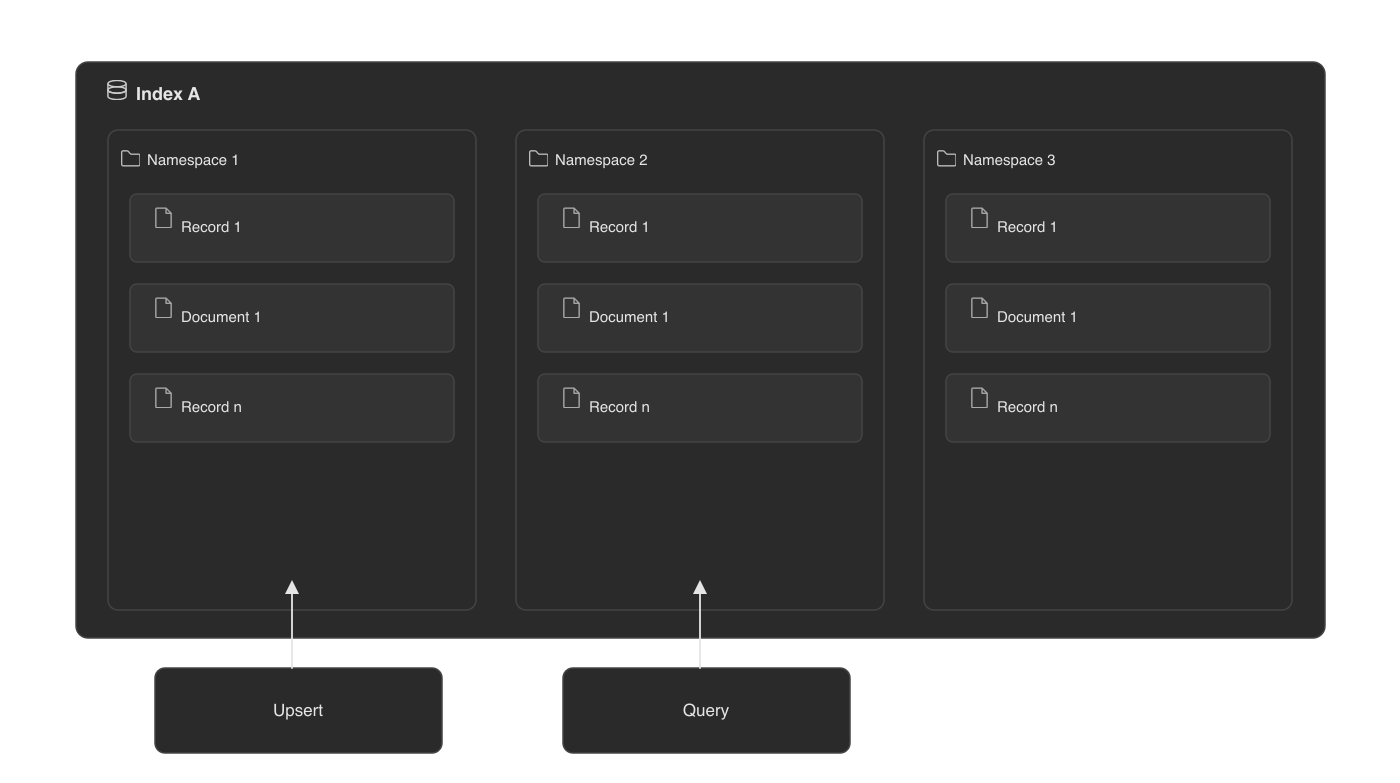 For more information, see Use namespaces.
Record
A record is the unit of data for indexes with dense vectors and indexes with sparse vectors: a record ID, one vector (or both vector types for single-index hybrid search), and optional metadata. With integrated embedding you can upsert raw text instead of a vector, and Pinecone embeds it at index time. When an item has more than one searchable field — say, a text field ranked by BM25 alongside adense_vector field for similarity — model it as a document.
For more information, see Upsert data.
Record ID
A record ID is a record’s unique ID. Use ID prefixes that reflect the type of data you’re storing.Dense vector
A dense vector, also referred to as a vector embedding or simply a vector, is a series of numbers that represent the meaning and relationships of data. Each vector is a point in a multidimensional space; each number is a coordinate in that space. Vectors that are closer together in that space are semantically similar. Dense vectors are stored in indexes (see Index with dense vectors). You use a dense embedding model to convert data to dense vectors. The embedding model can be external to Pinecone or hosted on Pinecone infrastructure and integrated with an index. For more information about dense vectors, see What are vector embeddings?.Sparse vector
Sparse vectors are often used to represent documents or queries in a way that captures keyword information. Each dimension in a sparse vector typically represents a word from a dictionary, and the non-zero values represent the importance of these words in the document. Sparse vectors have a large number of dimensions, but a small number of those values are non-zero. Because most values are zero, Pinecone stores sparse vectors efficiently by keeping only the non-zero values along with their corresponding indices. Sparse vectors are stored in indexes (see Index with sparse vectors) and can also coexist with dense vectors in a single index for hybrid search on the Vectors API. To combine a keyword signal with a dense signal in an index with a document schema, restrict a dense search with a text-match filter on astring field with full_text_search enabled or run separate searches and merge the results client-side. To convert data to sparse vectors, use a sparse embedding model. The embedding model can be external to Pinecone or hosted on Pinecone infrastructure and integrated with an index.
For more information about sparse vectors, see Sparse retrieval.
Metadata
Metadata is additional information included in a record to provide more context and enable additional filtering capabilities. For example, the original text that was embedded can be stored in the metadata.Document
A document is the unit of data in an index with a document schema, a JSON object with a required_id field, the ranking fields declared in the index’s schema, and any number of metadata fields. Documents support multiple ranking field types in a single record: a dense_vector field (for semantic search), a sparse_vector field (for sparse-vector retrieval), and one or more string fields with full_text_search enabled (for full-text search). A single document can carry vectors, text, and metadata together, and you choose the scoring method per query via score_by. Documents are the recommended shape for new multi-field and full-text workloads; vector-only indexes continue to use records. Both APIs are fully supported.
Document fields can hold structured values: a metadata string_list field holds an array of strings; a dense_vector field holds an array of floats; a sparse_vector field is an object with two parallel arrays, indices (token positions) and values (token weights).
A schema can declare up to 100 string fields with full_text_search enabled, but at most one dense_vector field and at most one sparse_vector field per index.
Metadata fields aren’t declared in the schema. Any field on an upserted document that’s not declared in the schema is stored, returned via include_fields, and automatically indexed for filtering. Pinecone infers metadata field types (string, number, boolean, array of strings) from the values you upsert.
Field names must be unique, non-empty strings, must not start with _ (reserved for system-managed fields like _id and _score) or $ (reserved for filter operators), and are limited to 64 bytes.
For more information, see Full-text search.